Setting Up Suprata for a Marina
If you're running a marina, Suprata's reservations subsystem was largely designed for you. Slips, dry storage, mooring balls, transients, seasonals, dockage billing, electric metering, audit walks, dockmaster operations — they all live here.
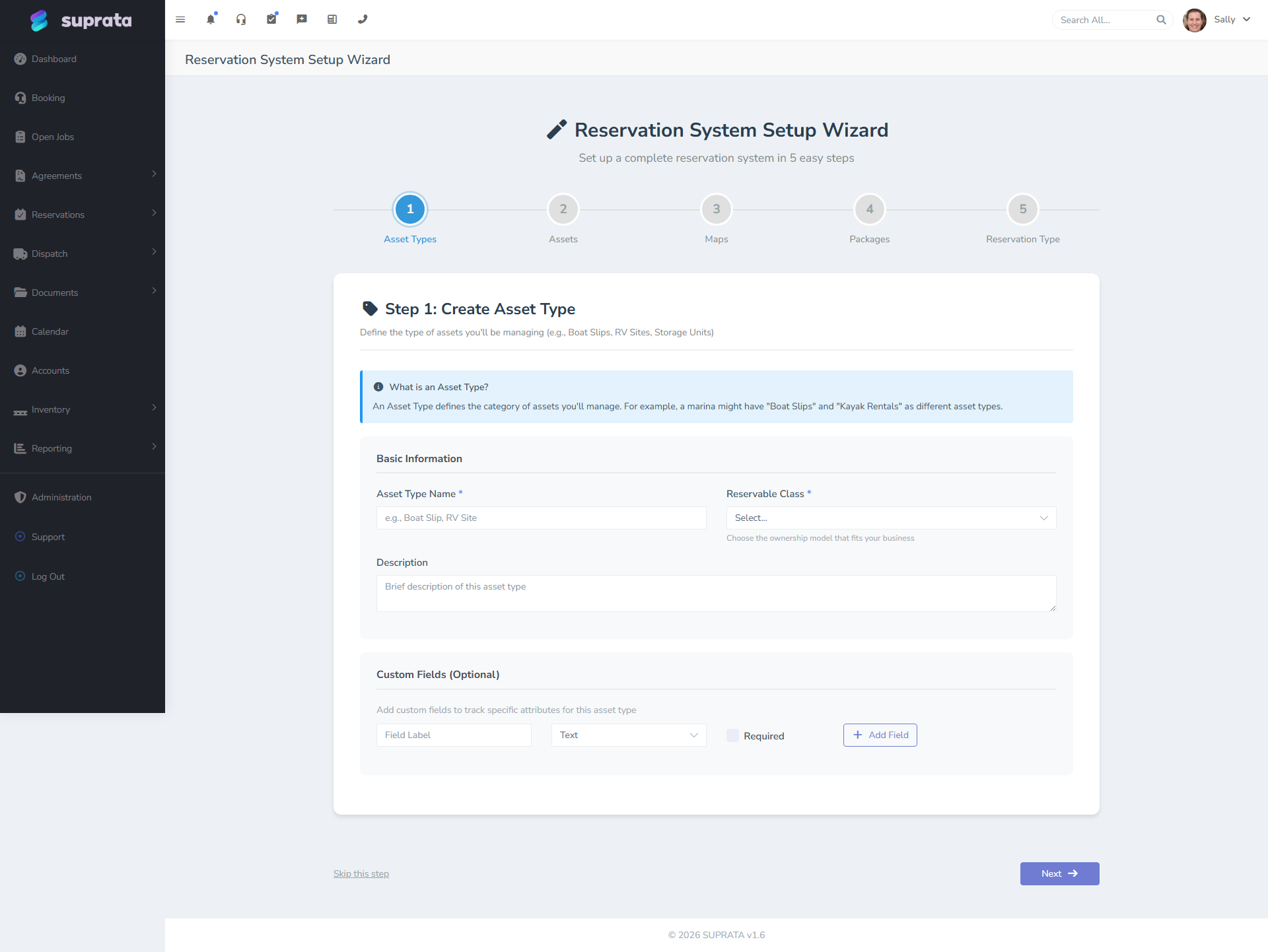
Start with the marina setup wizard. If your account is on a marina plan, it's the first thing you see when you log in. It asks about a dozen questions you already know the answers to and builds the scaffolding for you: your slip and boat types, a dock map with every slip drawn and numbered, per-foot dockage rates as real price-list items, and the packages and booking types to sell them under.
It gets you roughly 80% of the way to a working marina. This guide covers the wizard first, then the remaining 20% — the parts that genuinely need your judgement and can't be guessed from a form.
Before you start
Have these four answers ready. The wizard takes about twenty minutes if you do, and considerably longer if you're looking them up as you go:
- Your dock layout, in plain numbers. "Dock A has 12 slips, 30 feet by 12, finger piers both sides. Dock B has 8 slips at 45 by 16." You do not need an aerial photo to start — the wizard draws the map for you from those numbers. Bring a photo later if you want one.
- Your per-foot rates. Nightly, weekly, monthly, annual. Marinas price by the foot, and so does Suprata.
- What you accept. Monohulls? Catamarans? Megayachts? Jet skis? You'll tick these from a library rather than building them.
- Your deposit policy — and specifically whether it's a percentage of the stay or N months up front. Those are different things and the wizard makes you choose. More on that below.
A 40-slip marina can be taking bookings the same afternoon. A 300-slip operation with dry stack, mooring field and metered electric is still a multi-week project — but the wizard removes the first week of it.
Week 1 — The wizard, and what it builds
Step 1–2: Your marina, and what you rent
Basic contact details, then the kinds of berth you rent out — wet slip, covered slip, mooring ball, dry stack rack, land storage. One row per kind of berth, not per berth. If you have 60 identical wet slips, that's one row.
This is the distinction that trips people up most: what you rent (a slip) and what the customer brings (a boat) are two different things in Suprata. The slip is inventory you own and sell; the boat is gear the customer arrives with that has to fit. They're configured separately, on purpose.
Step 3: The boats you accept — from the library
Rather than building "Monohull Sailboat" by hand and hoping you got the fields right, you tick what you accept from a shared library: monohulls, catamarans, motor yachts, trawlers, sportfish, megayachts, PWCs, trailers. Each arrives with LOA, beam and draft fields already defined and — critically — already marked so that per-foot pricing knows which number to multiply.
That last point is worth dwelling on. "$2.50 per foot" is meaningless until the system knows to read LOA off the customer's boat. The library types have that wired. A boat type you invent by hand and give a field called "Size" to does not, and a 42-foot boat will quietly bill as one unit.
The library is filtered to marina types by default, but you can search across everything — plenty of marinas own a forklift.
Step 4: Your docks — and the map draws itself
Describe each dock: name, how many slips, how long, how wide, slips on one side or both. The wizard generates a top-down diagram of your marina, cuts a bookable slip out of every berth, numbers them the way marinas number them (A1 and A2 facing each other across the finger pier), and groups each dock as a zone so occupancy reports break down by dock without further work.
You are not stuck with the drawing. It's a clean schematic to get you operational today. When you have a drone photo or a site plan, upload it under Reservations → Maps and move the slips onto it. Everything booked in the meantime carries across.
Two caveats worth knowing up front:
- Every slip on a dock comes out the same size, because that's what you told it. Real docks have odd ones — the short slip at the head, the wide one by the ramp. Fix those individually afterwards.
- Slip sizes become fit constraints. A 48-foot boat won't be assigned to a 40-foot slip. That's the point, but it means a lazily-entered size will refuse a booking you wanted to take.
Step 5: Your rates
Enter your per-foot dockage rates and your utility and service charges. Each becomes a real price-list item — they invoice, tax and sync to QuickBooks like anything else you sell. Nothing about marina billing lives in a separate parallel system.
Utilities (30A, 50A, water) are set up as optional add-ons rather than mandatory lines, deliberately: a mooring has no shore power, and a required line would just mean staff deleting it on every booking.
Step 6: Deposits — the choice that matters
The wizard makes you pick between two deposit shapes, and they are not interchangeable:
- A percentage of the stay. Right for transients. 25% of a four-night stay is a sensible hold.
- N months up front. Right for annual and monthly tenants. 25% of a year is a number nobody asks for; "first and last month" is.
Pick "months" and long-stay bookings will hold that many whole months of dockage, while transients keep the percentage. Get this backwards and your annual customers will be quoted a deposit that makes no sense to either of you.
This step also sets check-in and check-out times, invoice terms, and which paperwork you require (insurance certificate, vessel registration). Required documents attach to the boat types, not the slips — the insurance belongs to the vessel.
Step 7: Review, then build
The last step tells you what exists and what's about to be created, including an explicit statement of whether per-foot billing is wired up. Read that line. If it says per-foot isn't ready, your dockage will bill one unit per boat, and you want to know that now rather than on your first invoice.
After the wizard: your individual slips
The wizard created every slip as a bookable berth with a size. What it didn't do is record per-slip detail it had no way to know — actual depth at mean low water, which pedestal serves which slip, whether A-7 has the broken cleat.
Open Reservations → Maps, click through the slips, and fill in what matters to you. Do it for the ones that differ from the norm first; the identical ones can wait.

Re-running the wizard
The wizard is safe to run again. Every step updates what it created the first time rather than making a second copy — change "twelve slips" to "fourteen" and you get two more slips, not a second Dock A. Slips you remove are deactivated rather than deleted, so nothing already booked in them is lost.
That makes it a reasonable tool for a genuine change, not just initial setup. Adding a dock next season? Run it again.
Week 2 — Pricing and packages
Refining what the wizard built
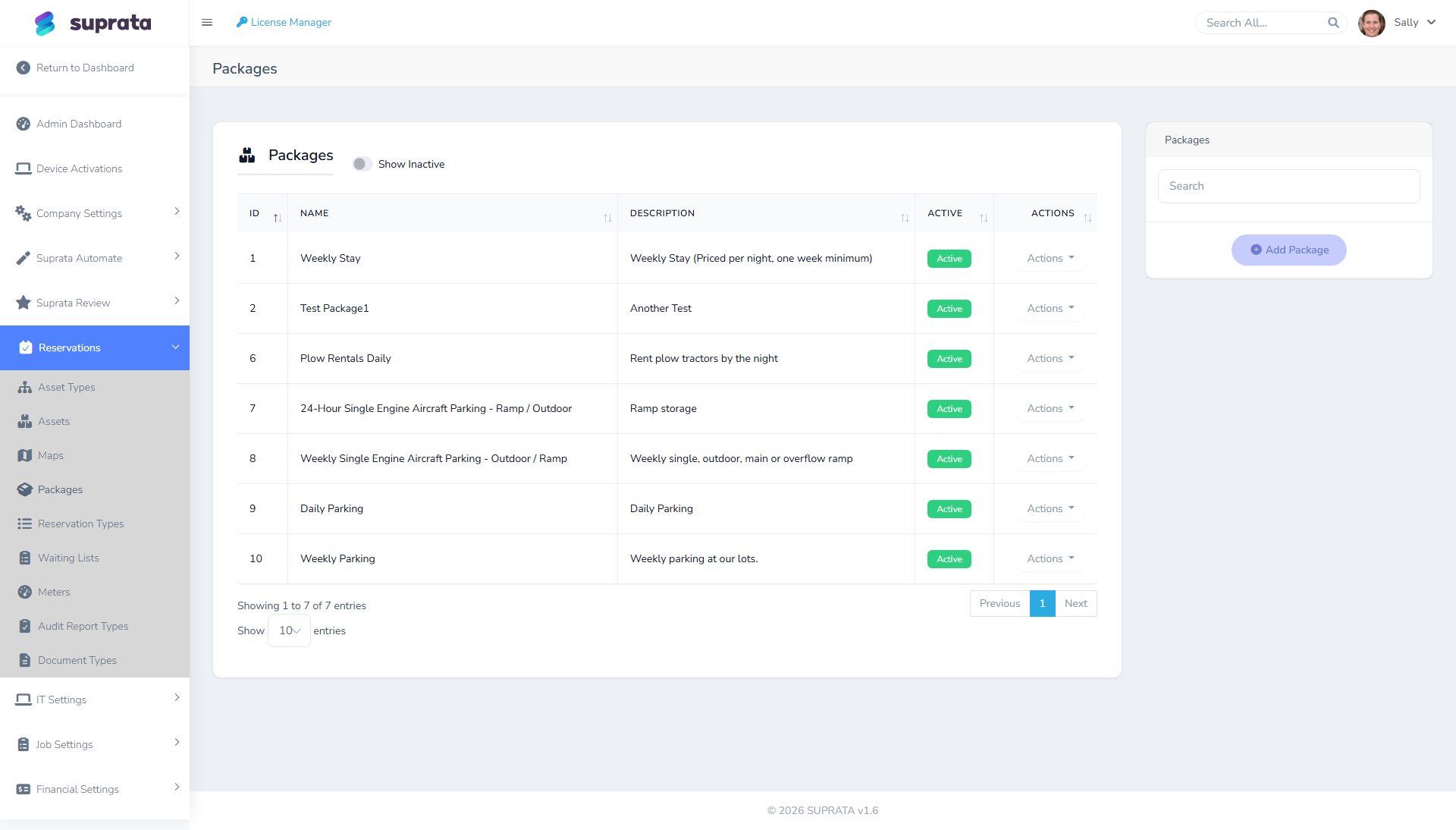
The wizard created a Transient package plus whichever of Weekly, Monthly and Annual you enabled, and the booking types to sell them under. That's a working price book, not a finished one.
A reservation type is a category of stay: transient (per-night), monthly, seasonal (multi-month, fixed window), annual. A package is a priced bundle for a specific reservation type and asset type combination.
Two things the wizard deliberately left alone:
- Seasonal windows. Your rates currently apply all year. If you charge more in summer, that's the rate calendar — see below.
- Packages that vary by berth kind. The wizard prices dockage the same whether it's a wet slip or a mooring ball. If a mooring is a flat nightly rate rather than per-foot, build that package separately.
Real-world example combinations:
| Reservation type | Asset type | Package |
|---|---|---|
| Transient | Wet Slip 30-amp | "Transient Daily — 30A" — $2.50/ft/night, $5 electric, $3 water |
| Monthly | Wet Slip 30-amp | "Monthly Slip — 30A" — $20/ft/month, electric metered |
| Annual | Wet Slip 30-amp | "Annual Moorage — 30A" — $80/ft/year, electric metered |
| Seasonal (May–Oct) | Wet Slip 50-amp | "Summer Season — 50A" — $1,200/ft/season, electric metered |
| Transient | Mooring Ball | "Mooring Daily" — $35/night |
| Annual | Dry Storage Outdoor | "Annual Dry — Outdoor" — $400/year |
Set up a package per real combination. Add-ons within a package handle electric/water/pumpout fees. Items in a package handle one-time charges like setup or cleanout.
Seasons and the rate calendar
If your summer rate differs from your winter rate — and at most marinas it does — build a rate calendar and point the dockage line at it. See Dynamic pricing and the rate calendar.
Do this before you take a season's worth of bookings, not after. Existing bookings keep the price they were quoted, which is correct behaviour but means a late-added season only affects new business.
Required documents per asset type
Marinas need paperwork. The wizard set up insurance and registration if you asked it to; this is where you extend that. For each asset type, define which documents are required before a reservation can finalize:
- All slip rentals: insurance certificate (with marina listed as additional insured), state vessel registration, USCG documentation if applicable.
- Liveaboards (long-stay): pet documentation if applicable, additional insurance.
- Mooring balls: insurance, mooring tackle inspection.
The documents subsystem will hold each required document, expire it on the date you set, and prompt customers to upload renewals. Configure the required document types now so the booking flow can enforce them.
Week 3 — Operations
Day 9-10: Meters
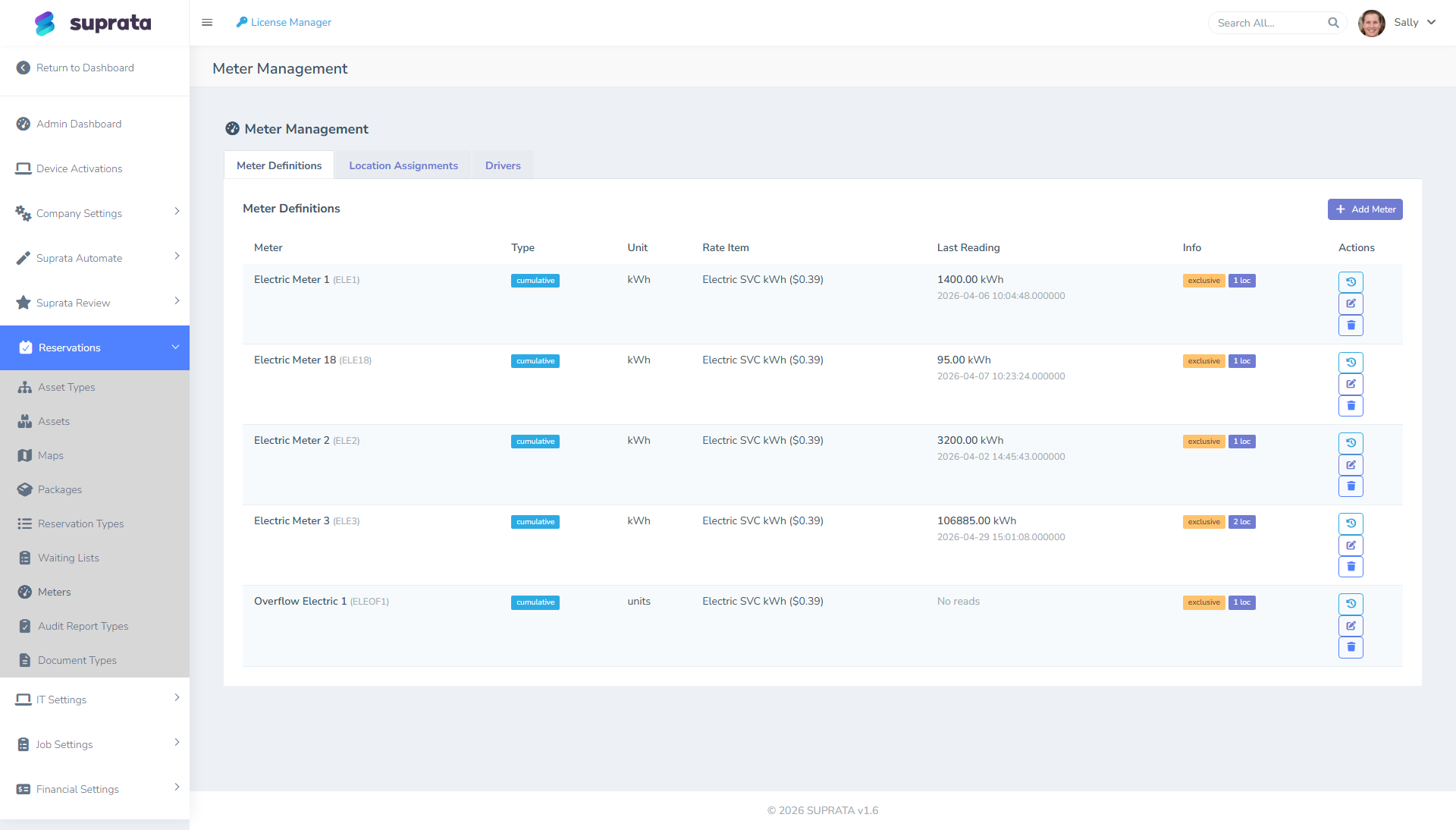
If you bill electric (and you should if your slips have meters), set up the electric meter for each metered slip:
- Define each meter as an asset.
- Assign it to the slip it serves.
- Configure how it reports — most marinas use either standard polling (Suprata reaches out to the meter on a schedule) or webhook-based meter readings (the meter pushes readings to Suprata), depending on what your meter hardware supports.
Once meters are set up, readings populate automatically (Suprata polls hourly or daily depending on your meter setup). At settlement time, the difference between current and previous reading × your rate per kWh appears on the customer's invoice.
If your meters are mechanical (read manually), there's a manual-entry path — a dockmaster reads the meter and enters the value through the meter readings screen. This is fine for small marinas; automate when you outgrow it.
Day 11: Late fees
Configure late fees for moorage. Typical setup:
- Annual / seasonal: 5% per month overdue, capped at 25%.
- Monthly: $50 flat fee at 10 days past due, $100 at 30 days.
- Transient: less common — if they don't pay, they don't leave.
Late fees apply automatically once configured. Test the configuration in a sandbox account before going live; once fees apply, undoing them is manual.
Day 12: Audit walks
A daily or weekly audit walk is how you keep tabs on the marina — checking each slip is occupied as expected, no unauthorized boats, no overdue paperwork, no obvious damage. Configure the audit walk template:
- What questions to ask per slip ("Is the boat present?", "Insurance current?", "Power cord secured?").
- What zones to walk (A Dock, B Dock, Mooring Field).
- Who walks (dockmaster, dock attendant).
Once configured, the dockmaster opens the walk on a tablet and works through each asset systematically. Findings flag for follow-up (a missing insurance cert generates a renewal email; an unauthorized boat generates a notice).

Week 4 — Settlement and billing
Day 13-14: Long-stay billing schedules (folio)
For monthly and annual customers, the system runs a settlement routine that periodizes their stay into billing periods. Configure the settlement cadence:
- Monthly customers typically settle on the 1st of each month. Their previous month's electric usage gets calculated, slip rent for the new month is billed, late fees applied if applicable.
- Annual customers typically settle once a year on contract anniversary. Or quarterly if you collect electric quarterly.
Settlement is automated. Don't manually invoice long-stay customers — let the settlement engine do it. If you start hand-invoicing on top of settlements, you'll get duplicate charges.
Day 15: Deposits and compliance
Marinas commonly hold deposits for damage. Configure how much deposit applies per asset type, when it's collected (at booking? at check-in?), and what happens at settlement (held? applied? refunded?). The deposit compliance screen tracks which reservations have appropriate deposits and which don't.
Day 16: Test bookings end-to-end
Before going live, run real test bookings:
- A transient booking (one night, walks in, pays at the helm).
- A seasonal booking (May 1 – Oct 31, deposits, paperwork, settlement).
- An annual booking (full year, electric metered, late fees configured).
Walk each one through end to end: customer-facing email, deposit collection, document upload, daily audit walk presence, settlement at month-end, electric meter reading, late fee triggering. Whatever bothers you in the test will bother your customers later.
Day 17-21: Train your team
The dockmaster, dock attendants, and office staff each need different training:
- Dockmaster: audit walk, daily reservation list, walking the docks with the tablet, handling no-shows and walk-ins, taking transient payments at the helm.
- Dock attendants: assisting with arrivals, taking deposits, signing in transients via the booking app, basic audit-walk recording.
- Office staff: monthly settlement review, late fee management, document follow-up, deposit refunds, customer billing questions.
Plan an hour per role, walking them through the parts they'll use daily. Don't try to teach the whole system to anyone — they don't need it.
Going live
Live day is anticlimactic if the prep was thorough. Stop using your old system; start using Suprata. Watch closely for the first month — most issues surface in the first 30 days as edge cases hit (a weird package combo, a customer with two boats, a meter that's not polling).
If you're switching mid-season, you have two choices: cut over cleanly (everyone re-enters effective the cutover date) or import history (every active reservation gets entered into Suprata representing its current state). The first is simpler, the second preserves continuity. For most marinas, cutover at the start of a billing cycle is the path of least pain.
Common mistakes
Treating the wizard's output as finished. It gets you to 80% and says so. The remaining 20% — seasons, metering, per-slip depths, audit walks, settlement review — is the part that needs your judgement, and none of it is optional if you want the system to run itself.
Not checking the per-foot line on step 7. If per-foot billing isn't wired up, every boat bills as one unit and your revenue is wrong from the first invoice. The wizard tells you plainly. Read it.
Building boat types by hand when the library has them. A hand-built type with a field called "Length" that isn't marked as the canonical measurement will not multiply your per-foot rate. Import from the library and you inherit that wiring for free.
Picking a percentage deposit for annual tenants. 25% of a year is not a deposit anyone asks for. Use "months up front" for long stays.
Skipping the map. The map isn't decoration. The booking flow, the dockmaster's daily walk, the audit walk — all reference it. The wizard draws you one, so there's no excuse for not having it — but a drawn schematic is a starting point, not a survey.
Setting up too few asset types. If every slip is just "Wet Slip", you can't price differently by amperage or length and you can't enforce different document requirements. Take the time to define the real categories.
Not metering electric. Marinas underprice electric on default packages because they assume average use, then end up subsidizing high-draw boats (megayachts, AC-running liveaboards). Metering pays for itself fast.
Letting documents expire silently. Suprata will automatically email customers about expiring insurance, but only if you configured the document types and required-document mappings. If you skipped that step, expiries pass silently and you're holding boats with lapsed insurance.
Manual-billing long-stay customers. The settlement engine exists for this. Doing it by hand creates duplicate charges, missed metering, and reconciliation nightmares.
Treating annual customers like transients. Annual customers are reservations with a long date range, billed via settlement cadence — they're not a service agreement, not a subscription, not a recurring invoice. See Subscriptions vs. service agreements vs. recurring invoices for why.
Not running the audit walk consistently. The walk catches problems early — uninsured boats, broken pedestals, the boat that didn't actually arrive. Skip a few weeks and you find out at month-end.
What you can defer
- Custom forms for slip-specific data (e.g., capturing boat measurements during arrival). The standard intake form covers most marinas; build customs only if you find a gap.
- Public waitlist for full marinas. Worth it eventually but not for week-one operations.
- Automation — auto-emails, auto-renewals. Wait until you've done renewals manually for a season; you'll automate the right things.
- Customer-facing booking widget. The internal booking flow handles all bookings staff make. The public widget for customers to book themselves comes later.
Related articles
- Is the reservations system right for you?
- Importing asset types from the library
- Setting up asset types
- Building a package
- Uploading and configuring your property map
- Long-stay billing and settlements
- Setting up utility meters
- Audit walks: the monthly property inspection
- Setting up Suprata for a campground
- Setting up Suprata for a marine service company