Audit Walks: The Monthly Property Inspection
Anyone who's run a marina or campground knows the feeling: walking the property and noticing the rotted dock board you forgot about, the busted electric pedestal that's been wonky for weeks, the trash that piled up in the back section. Audit walks turn that informal check into a structured, repeatable, auditable process.
A walk is a session — staff go through the property, check each asset against a template, record findings, and attach photos. The output is a record of property condition over time, useful for maintenance scheduling, insurance claims, and proving compliance to regulators.
When you'd use this
Run audit walks when you operate a property where:
- Conditions degrade between bookings — docks rot, pedestals fail, sites get rutted, units accumulate damage.
- Maintenance scheduling matters — knowing which dock board to replace this week vs. which can wait two months.
- Insurance or regulatory compliance requires inspection records — many marinas, RV parks, and storage facilities have to demonstrate due-diligence inspections.
- You have multiple staff and want consistency in how property condition is recorded.
Skip audit walks if you're a single-operator property doing your own daily walk-arounds and don't need formal records — a notebook may be enough.
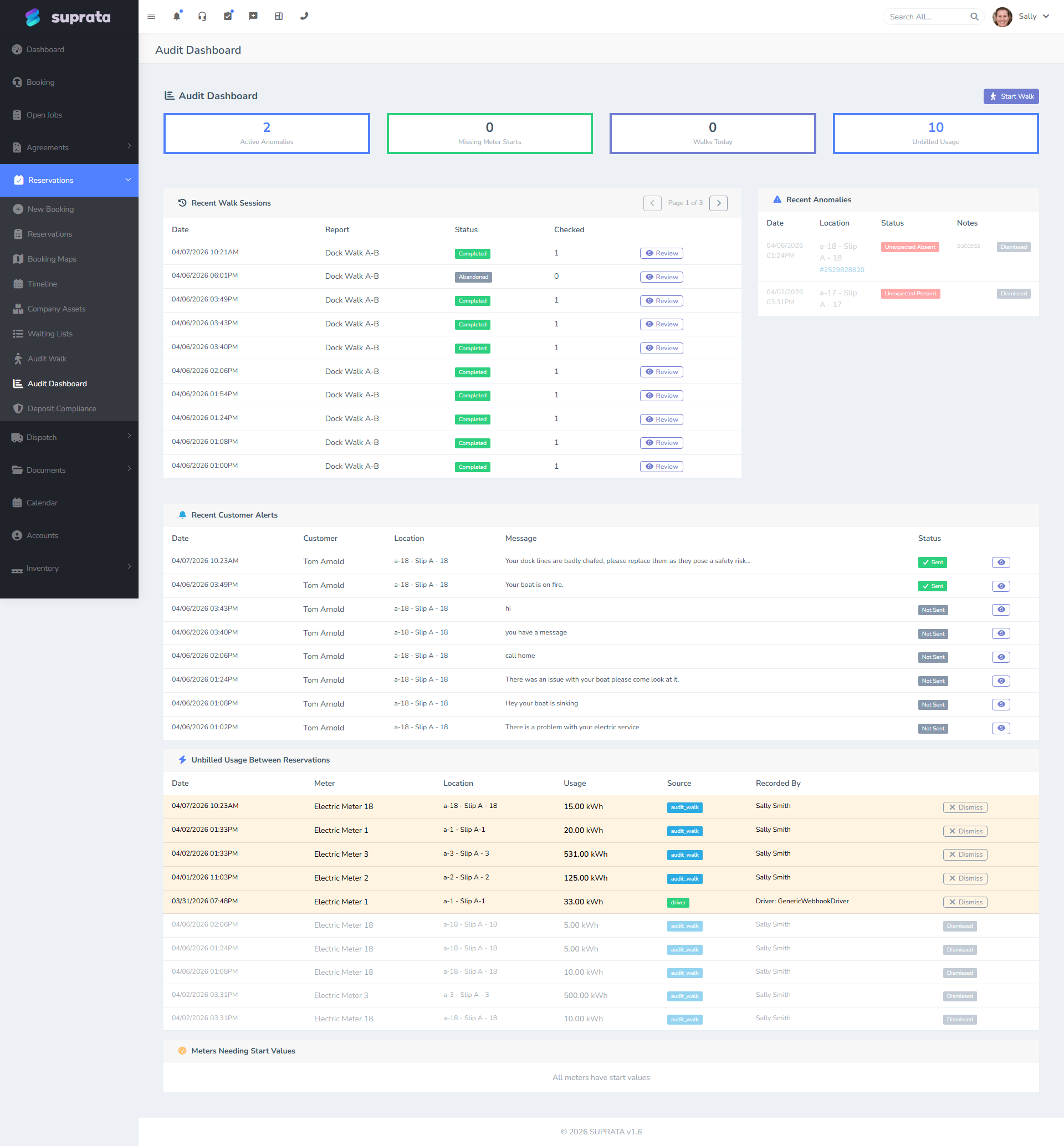
What an audit walk produces
A completed walk creates a structured record:
- The session itself — when it ran, who walked, what type of walk it was.
- Per-asset responses — for each asset visited, the condition rating, any specific findings, and photos.
- Action items — derived from the findings: "replace dock board on Slip A-12," "investigate flickering pedestal on Site 47."
Over time you accumulate a history per asset — Slip A-12 had a busted cleat in March, was repaired in April, was fine in May, June, July. That history is valuable when an insurance claim comes up six months later.
When to run them
Cadence depends on what you're checking:
- Daily walks — typical for high-traffic transient parks during peak season. Quick, ~15 minutes, focused on safety hazards and trash.
- Weekly walks — typical for medium-traffic parks. ~1 hour. Each asset visited briefly.
- Monthly walks — typical for storage facilities and marinas in shoulder season. 2–4 hours. Detailed.
- Quarterly walks — for off-season properties or for specialized inspections (electrical, plumbing).
- Pre-season and post-season walks — most operators do a thorough walk at season open and close, with a longer template covering everything.
A common pattern: short daily walks during peak season for safety and trash, monthly thorough walks for condition tracking. Two templates, two cadences.
The setup — audit report types (templates)
Before you can run walks, define one or more audit report types. A report type is a template — the list of things to check at each asset. Examples:
- Daily Safety Check: trash present? tripping hazards? electrical pedestal damage? water leak visible?
- Monthly Slip Condition: cleat condition? finger pier condition? bumper condition? shore power amperage reading? water connection leak-free? overall rating 1–5?
- Annual Comprehensive: all of the above plus dock board count, board condition, pedestal certification date, etc.
A good template is specific enough that any staff member walks consistently but short enough that they actually fill it in. A template with 40 questions per site means staff cut corners. Aim for 5–10 questions max for routine walks; longer templates only for annual inspections.
Running a walk — the typical flow
- Open the audit walk screen and start a new session.
- Pick the report type. This determines the questions per asset.
- Record participants — who walked. Important for accountability.
- Walk the property. At each asset, the screen presents the template questions. Answer them, take a photo if relevant, move to the next.
- Submit the session when complete. The findings are now part of the audit dashboard.
Most audit walks are run on a phone or tablet — easier to carry, and the camera is right there for photos. The interface is built to work on mobile; if it isn't behaving on your device, file a support ticket.
Comparing against the last walk — "On File" photos
When you arrive at a slot, the walk screen shows an On File — Previous Photos strip above the camera: thumbnails of the photos taken on earlier walks for the reservation that's expected to be there now. Tap one to enlarge. The point is to answer the question that matters at the slip: is this the same boat (or RV, or trailer) that's supposed to be here? You're comparing the asset in front of you to the asset on record, not guessing from a name on a clipboard.
A few things worth understanding about how this behaves, because it's deliberately conservative:
- Photos follow the reservation, not the slot. They're tied to whoever booked the space, so when one guest checks out and a new reservation takes the same slip, the new walk starts clean — you don't see the previous guest's boat and mistake it for the current one.
- It accumulates over the stay. A monthly or seasonal tenant builds up a photo history across every walk, all under their one reservation. Next walk, you see all of it.
- It handles "owner away, transient in the slip" correctly. If a slip owner has flagged themselves Available While Away and a transient is occupying the space, the On File photos show the transient's prior shots (if any) — not the absent owner's. The owner isn't expected on site, so their boat photos would only confuse the comparison.
This is reference-only — it doesn't change what you record. You still take this walk's photos with the camera button as usual.
What the dashboard tells you
The audit dashboard surfaces:
- Recent sessions — what's been walked and when.
- Open findings — issues recorded but not yet resolved.
- Asset history — for any one asset, a chronological list of past findings.
- Trend signals — assets that get flagged repeatedly, suggesting deeper issues.
Make the dashboard a weekly review for the operations manager. Open findings that sit for weeks are findings nobody is fixing.
Recommended defaults
- Two templates max to start: a quick daily template (trash + safety) and a monthly condition template. Add specialized templates only when staff are asking for them.
- Run walks on a phone/tablet, not paper-then-data-entry-later. Re-keying paper notes loses photos and introduces transcription errors.
- Photo every finding. Pictures end disputes. A few seconds with the camera saves you from the "you broke that, not us" argument later.
- Close findings explicitly when fixed — the dashboard's value depends on it. An "open findings" list of 200 stale items isn't actionable; a list of 5 real items is.
- Review the dashboard weekly with whoever does maintenance.
Common mistakes
- Templates that are too long. Staff start clicking "OK" on everything to get through the walk faster. The data is meaningless.
- No photos. Findings without photos are claims without evidence. When a customer disputes a damage charge or a regulator asks for inspection records, photos are the difference.
- Walks that never get reviewed. If findings sit unread, walks become busywork. The dashboard is the point.
- One person doing every walk. Patterns emerge from multiple eyes. Rotate walkers; have at least two staff who can run a walk.
- Skipping the post-season walk. It's the most informative walk of the year — full property assessment with off-season time to fix things. Skipping it pushes problems into next season.
- Not closing findings when fixed. Open-finding count grows unbounded; the dashboard becomes useless.
- Editing completed walks after the fact. The whole point of an audit walk is that it's a record of what was true on a given day. If something needs correcting, add a new finding rather than rewriting the old one — otherwise the trail looks tampered-with if a regulator or insurance adjuster asks for it.