Required Documents per Asset Type
A wet slip needs a current vessel insurance certificate. A monthly storage unit might need a copy of a government ID. A long-term cabin lease might need a signed agreement on file. Configure these requirements at the asset-type level and the system tracks who's missing what — automatically, without sticky notes.
When you'd use this
Configure required documents when:
- Your insurance carrier requires you to maintain proof of tenant coverage (almost universal at marinas).
- State or local regulations require you to keep records (vessel registration in some states, ID copies in some storage jurisdictions).
- Your lease or contract lists conditions that require ongoing documentation (proof of insurance for cabin renters, vehicle registration for long-stay RV residents).
- You want automated expiry alerts when those documents lapse.
Skip required documents if your operation genuinely doesn't need any (transient parks where you don't track anything beyond the credit card, for example). It's perfectly valid for an asset type to have zero required documents.
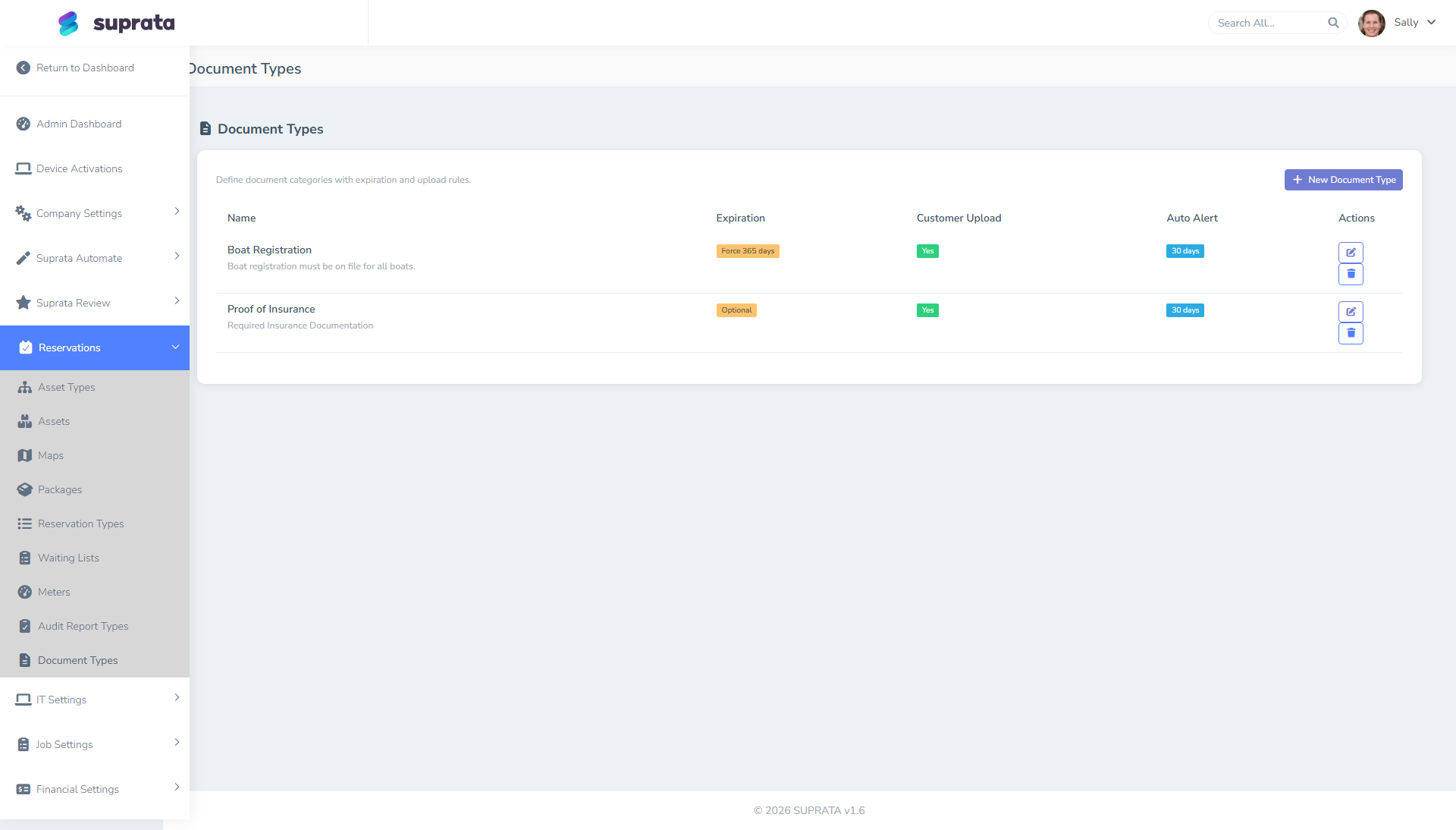
How the system models documents
Three pieces:
- Document types — categories like "Vessel Insurance Certificate," "Government ID," "Vessel Registration," "Signed Lease," "Vehicle Registration." Each type has a name, an optional description of what's expected, and an expiry behavior (does this kind of document have an expiration date, or is it once-and-done?).
- Asset-type requirements — which document types are required for which asset types. A wet slip might require [Insurance, Registration]; a tent site might require none.
- Per-reservation document storage — actual uploaded documents tied to a specific reservation, with a date uploaded and (where relevant) a date the document expires.
The system gates booking on missing required documents (configurable — gate hard, gate soft, or warn only) and runs a daily expiry-alert check that flags documents lapsing in the near future.
Common requirements by industry
If you're staring at a blank screen wondering what to require:
Marinas:
- Vessel insurance certificate (named insured matches owner, liability minimums, you listed as additional insured if you require). Expires annually.
- Vessel registration (current state registration). Expires 1–3 years.
- Pumpout sticker / sanitation device certification (where required by jurisdiction).
- Signed slip lease or rental agreement (one-time at booking).
RV parks (long-stay):
- RV insurance certificate (some parks require, many don't).
- Vehicle registration (long-stay residents).
- Driver's license / government ID copy.
- Signed long-stay agreement.
Storage facilities:
- Government ID copy.
- Signed storage agreement / contract.
- Insurance disclaimer or insurance certificate (varies by state).
Cabin / cottage rentals:
- Government ID at check-in.
- Signed rental agreement.
- Pet release form (if pet-friendly).
These are starting points. Adjust based on your insurance carrier's requirements and your local laws — they'll give you the specifics.
Setting it up — the typical flow
- List the document types you need on paper before opening the screen. For each, decide: does it expire? If yes, on what cadence?
- Create the document types in the system. One per type. Use customer-friendly names ("Vessel Insurance Certificate" — not "InsCert").
- Attach document types to asset types. For each asset type, mark which document types are required and which are optional.
- Set the gating behavior — does the booking wizard hard-block bookings without these documents (won't confirm), soft-block (warns and asks for an override), or just warn (lets the booking proceed but flags it on the compliance dashboard)?
- Set the expiry-alert lead time — how many days before expiry should staff be alerted? 30 days is typical.
- Run a few test bookings to confirm the gating works the way you expected. Don't go live until you've confirmed the flow.
Recommended defaults
- Hard-block the booking wizard on missing critical documents for asset types where the document is non-negotiable (marina insurance is the classic example — your insurance carrier may require you to gate this).
- Soft-block (override-with-note) for documents that are nice-to-have — government ID copies, for example. Block the booking by default but allow an override with a manager's note.
- Just-warn for documents you're collecting for your own records but that don't have a regulatory or insurance hook.
- 30-day expiry lead time is the right default for annual documents. Less and you don't have time to chase the customer; more and the alert is forgotten.
- Use the customer upload link feature rather than asking customers to email documents to staff. Email-attached PDFs disappear into inboxes; uploaded documents land directly on the reservation.
- Approve documents promptly. A document the customer uploaded but no staff has reviewed is functionally the same as no document. Build a daily review habit.
What customers see
When a customer books an asset type with required documents:
- The booking wizard tells them which documents will be required.
- After booking, they receive a confirmation email with an upload link for any documents they haven't already provided.
- If documents expire during their stay, they'll be asked to upload renewals.
Customer-friendly copy in your document type descriptions matters. "Insurance certificate showing minimum $300,000 liability with our marina listed as additional insured" is helpful; "InsCert per policy" is not.
Common mistakes
- Requiring documents you don't actually need. Each requirement is a friction point in the booking flow. If you don't actually look at vessel registrations, don't require them.
- Not enforcing what you require. Gating the wizard but allowing staff to override on every booking is the same as not requiring it. Either enforce or don't bother.
- Document types with no expiry on documents that do expire. Insurance certificates expire annually. A configuration that treats them as one-time-and-done means you'll be carrying expired insurance certs and not knowing.
- No customer-facing description. Customers don't know what "Insurance Certificate" means in your specific context. Spell out the requirements (minimum coverage, additional insured language, etc.).
- Storing documents but never reviewing them. Compliance is a posture, not a checkbox. Review uploaded documents within 24 hours of receipt.
- Hard-blocking everything. Front-desk staff will work around it (manually creating reservations, bypassing the wizard) and you lose all the data hygiene the system was supposed to provide. Block what truly must be blocked; warn on the rest.
- Not communicating expiring-document alerts to the customer. Staff get the alert but no one tells the customer. Set up an automated email to the customer 30 days before expiry asking for the renewal.
- Asking for ID copies you can't legally store in some jurisdictions. Consult local privacy law before requiring sensitive documents.