Setting Up Utility Meters
Long-stay tenants — monthly slip occupants, year-round RV residents, climate-controlled storage tenants — often pay rent plus their actual utility usage. Sub-metering is the difference between charging $500 flat and charging $500 plus $87 for the 412 kWh they used last month.
Suprata can track a meter for each asset, capture readings on a schedule, and roll the usage onto the tenant's monthly invoice automatically.
When you'd use this
Set up meters for:
- Marinas with shore-power tenants on monthly slips paying their own electric.
- RV parks with seasonal or extended-stay residents where electric usage varies enormously by season (running A/C all summer vs. nothing in winter).
- Self-storage with climate-controlled units where electric is sub-metered.
- Commercial dock tenants paying water usage.
Skip metering for:
- Transient bookings where utilities are bundled into the nightly rate.
- Properties where utilities are flat-included by policy.
- Sites where you don't actually have sub-meters installed. Software metering on top of a single property meter is not metering; it's an estimation game and tenants will dispute it.
If you don't have physical sub-meters, install them before configuring meter records. The physical hardware comes first.
How meters work in Suprata
Three pieces:
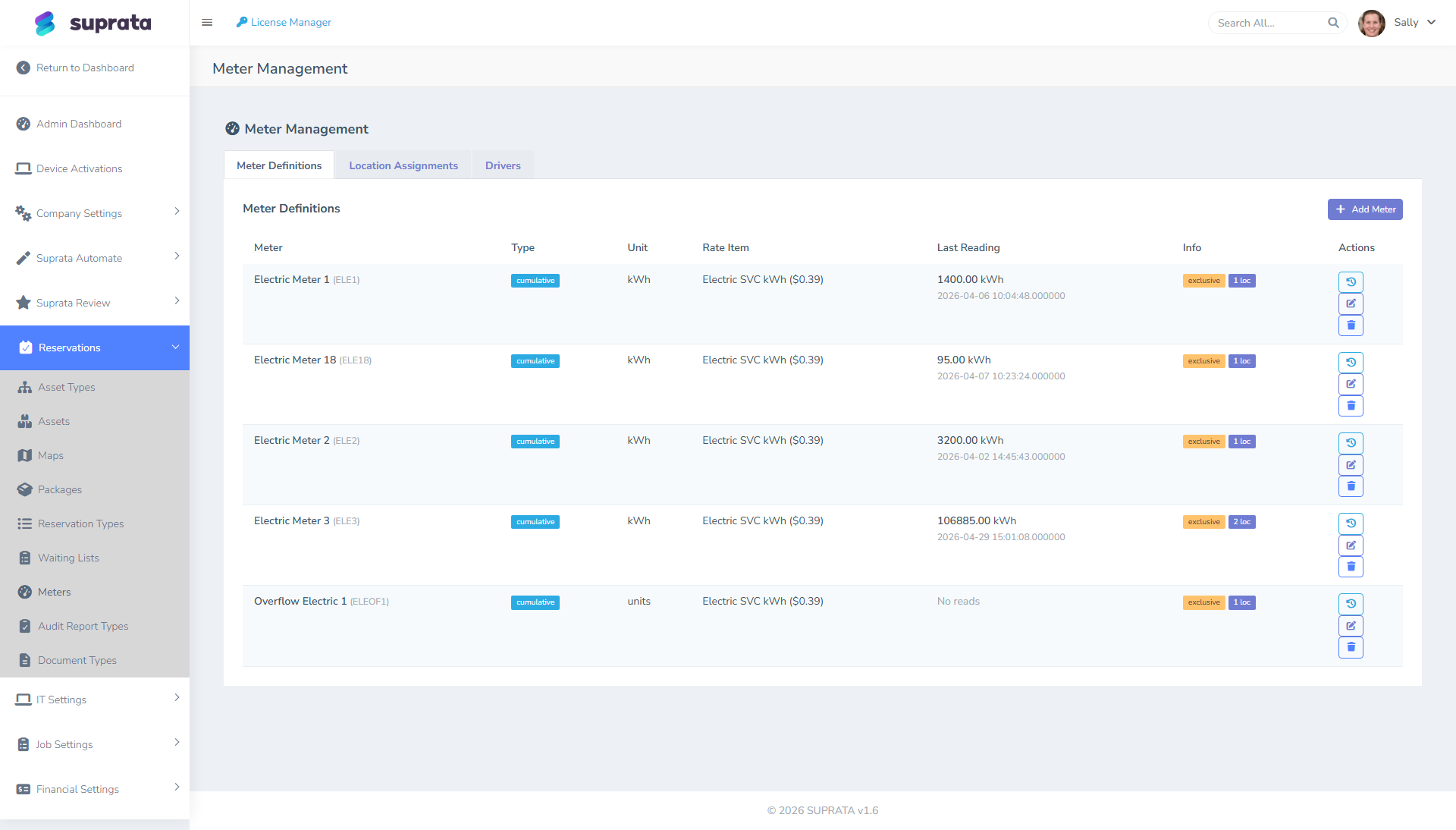
- The meter — a physical device. It has a serial number and a type (electric, water, sewer dump).
- The assignment — which asset the meter is currently attached to. When a tenant moves out and a new one moves in, you update the assignment, not the meter itself.
- The readings — the timestamped values that the meter reports (kWh, gallons, etc.). The difference between this period's reading and last period's is what the customer gets billed for.
Billing is straightforward: this period's reading minus last period's reading, multiplied by your rate per unit.
How readings get into Suprata
Readings come in one of two ways: either Suprata reaches out to the meter on a schedule and pulls the latest reading, or the meter pushes its readings to Suprata as they happen.
If your meter supports the second style (most modern smart meters do), use that — it's lower-maintenance and the data is closer to real-time. If it doesn't, scheduled pulls work fine; once an hour is plenty of resolution for monthly billing.
A handful of older meter brands aren't supported out of the box. If your brand isn't on the supported list, contact support before you buy the meter — adding new brands is possible but it takes time.
The typical setup flow
- Install the physical meters and verify they're reading correctly. Get the hardware working before you turn on the software side.
- Add each meter in Suprata, one per physical device, with its serial number and type (electric, water, sewer).
- Pick how readings will come in for that meter — pushed from the meter as they happen, or pulled by Suprata on a schedule. Enter whatever connection details the meter brand asks for.
- Take a baseline reading by manually entering the meter's current value. Going forward, the system bills the difference between readings, so you need a starting point.
- Assign each meter to its asset with a start date.
- Set the rate per unit ($0.16 per kWh, $0.04 per gallon, etc.) — usually on the asset type so it applies to every asset of that type, with overrides per asset if needed.
- Wait for at least one real reading to come in before going live. Confirm it shows up against the right meter and right asset. Don't trust the setup until you've seen a real reading flow through end-to-end.
Billing cycles — when does the meter charge get applied?
Meter readings produce charges that appear on the next settlement invoice for the assigned reservation. The typical cadence:
- Monthly tenant.
- The monthly settlement runs on the 1st, generating the upcoming month's rent.
- Same run picks up the prior month's metered usage (most recent reading minus prior period's closing reading) and adds it as a line item.
- Customer sees one invoice with rent + utilities.
For this to work cleanly, meter readings have to land before the settlement runs. If your meter is set to report at 4 AM and settlements run at 2 AM, every invoice will be a cycle behind. Get the order right.
Recommended defaults
- Let the meter push readings to Suprata if it can; fall back to scheduled pulls if not.
- Read at least daily, even if you only bill monthly. Daily readings catch a stuck or runaway meter the day it goes wrong instead of at month-end.
- Set the rate on the asset type, override per asset only when a specific tenant negotiated something different.
- Bill at cost or near-cost. A 10% markup is fine and customary, but a 50% markup invites disputes the moment a tenant looks up their utility's actual rate.
- Show meter readings as line items on the invoice — "412 kWh × $0.16 = $65.92" gets disputed far less than a single "Electric: $65.92" line.
Common mistakes
- Starting a meter without a baseline reading. The first invoice will charge the tenant for everything the meter ever read. Always set a baseline when you assign the meter.
- Forgetting to update the assignment when a tenant moves out. The next tenant inherits the prior tenant's usage. Always close the assignment at move-out and open a new one at move-in.
- Wrong units. A meter that reports cubic meters being billed at a per-gallon rate. Verify the units before going live.
- Mechanical meter rollover. Older mechanical meters wrap to zero at, say, 99,999. The next reading looks like negative usage. Smart meters handle this; older mechanical ones need special attention. If you're using rollover-prone meters, talk to support during setup.
- Charging metered usage to a transient guest. Transient guests don't expect a follow-up bill. Either bundle utilities into the nightly rate, or only meter long-stay assets.
- Disabling a meter mid-cycle without a final reading. You'll bill the tenant for an estimate or for nothing. Always take a final reading before retiring a meter.