The End-of-Month Routine
End of month is when the daily and weekly habits get audited against reality. Numbers either match, or they don't. Customers either get statements, or they don't. Recurring invoices either go out, or they don't. The cost of skipping any of it isn't immediate — it shows up four months later as a thousand-dollar billing dispute, an A/R balance you can't explain, or a January QuickBooks reconciliation that takes three days instead of three hours.
This article is the spine for that monthly pass. Plan on three to four hours of focused work on the first business day of the new month for a small-to-medium service business. Larger operations should split this work across two days. Either way, it's the highest-leverage few hours of the month for the back office.
Why a routine, not "I'll get to it"
The fundamental property of bookkeeping problems is that they compound. A small mismatch between your billing system and QuickBooks in February becomes a "where did this number come from?" mystery by May. A customer with an unreviewed past-due balance in March becomes a write-off conversation in August. The end-of-month pass is the regular forcing function that catches these while they're still small.
It also gives you an unambiguous moment of truth on your business. After the pass, you can say with confidence: this is what we billed, this is what we collected, this is who owes us, this is what's recurring next month. That clarity is worth a few hours of methodical work.
Step 1 — Run the Billing & Sales report and reconcile to QuickBooks
The first stop is the Billing & Sales report for the month just ended. This is the big number — total invoiced, total collected, total tax billed, broken down by category.
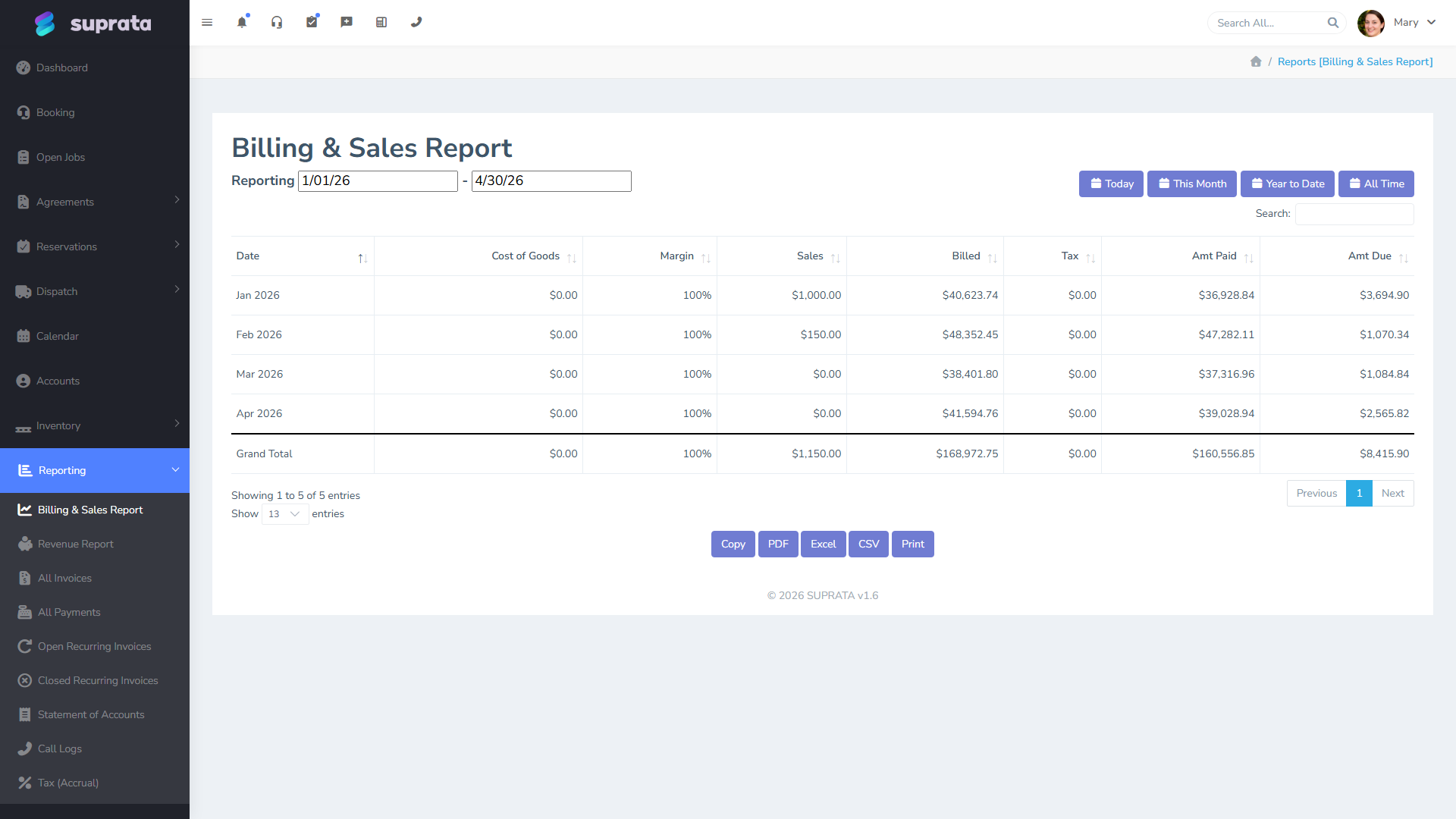
Pull the same report for the same month from QuickBooks (or whatever your accounting system is). The two should match. If they don't, the gap is almost always one of these:
- Invoices closed in Suprata but not synced. Check the QB sync log. Failed syncs sit in a queue waiting on a fix — usually a missing customer mapping, a missing item, or a tax-code mismatch. See Reading the QuickBooks sync report and Sync failures with QuickBooks.
- Payments recorded in Suprata but not in QB. Same syndrome, payment side. Often the customer mapping was OK for the invoice but a payment method changed and the QB side rejected it.
- Voided/refunded invoices that aren't reflected on both sides. Voids and refunds are the most common reconciliation gaps because they cross both systems and have to sync correctly in both directions.
- Sales tax categories that don't map cleanly. See QuickBooks tax-code mapping.
Reconcile until the two reports agree, or until you have a documented explanation for why they don't (e.g., a known timing difference for invoices closed on the last day of the month that synced on the first of the new month — those will be in the next month's totals on one side).
Step 2 — Review the aging report
The A/R aging report buckets unpaid invoices by how long they've been outstanding: 0–30 days, 31–60, 61–90, 90+. Pull it; print it; mark it up.
For each bucket:
- 0–30 days. No action needed. These are normal Net-30 customers within their terms.
- 31–60 days. Trigger a "past due" reminder. The system can do this automatically if you've configured it (see SMS templates for past-due reminders), but it's worth glancing at the list to confirm the reminders went and to spot anything weird (an unusually large balance, a customer you didn't expect to be slow).
- 61–90 days. Personal phone call from the office. By this point an automated reminder isn't enough; the customer either has a problem with the invoice (dispute, billing question) or has cash flow trouble of their own. Either is best handled in conversation.
- 90+ days. Decide. Is this collectable? Send to collections? Write off? Some of each? This is a judgment call that depends on your business, but it shouldn't be ignored. A 90+ balance that nobody's looked at in a year is effectively a write-off you haven't admitted yet.
The aging report is also where you'll spot the small chronic late payer who has always been on the 31–60 bucket but creeps higher every month. That's a customer-management conversation, not just a billing one.
See The aging report.
Step 3 — Generate statements for customers with balances
Customers with non-zero balances at month-end should get a Statement of Account. A statement is different from an invoice — it summarizes everything they owe, payments received, credits applied, current balance — across all their open invoices. It's the document a customer wants when they're trying to reconcile their own books or when they're disputing a charge.
Generate statements in bulk for everyone who has a balance, or selectively for the larger or more delinquent ones. Send by email; the link goes to a payable summary page.
If a customer has a credit on file (overpaid, was refunded but credit was issued instead of returned, etc.), the statement shows that too. Make sure your statement template surfaces credits clearly — it's a common source of confusion.
See Statement of Account.
Step 4 — Process recurring invoices for next cycle
Recurring invoices are the subscription-style billings — monthly maintenance contracts, retainer arrangements, slip rental in a marina, anything that bills the same customer the same amount on a schedule. They live separately from one-off invoices and have their own report.
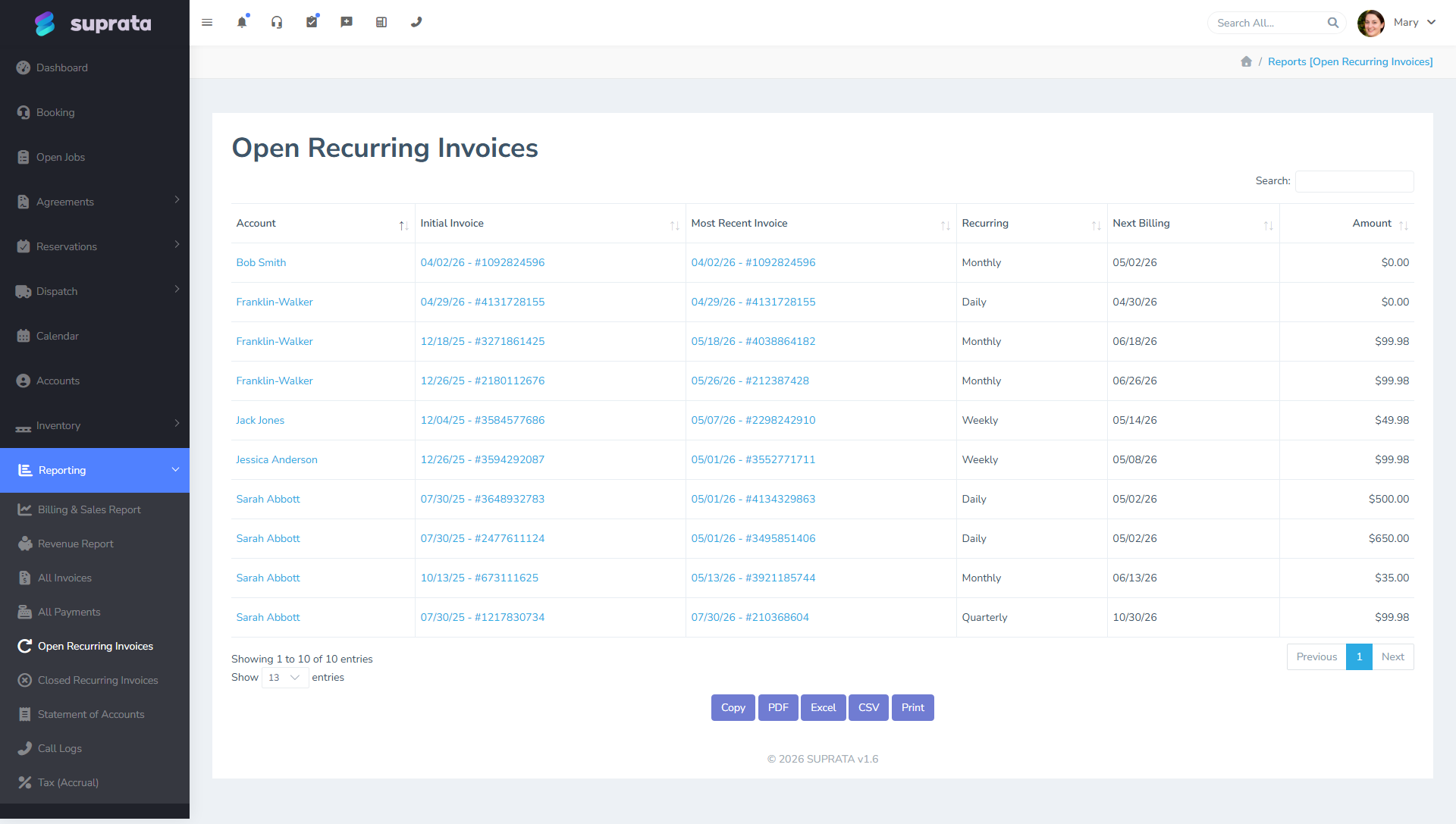
For the upcoming month:
- Confirm the list. Anyone who shouldn't bill (cancelled their service, on hold, prepaid for a longer period)? Pause or remove them.
- Confirm the amounts. Annual rate increases, mid-cycle plan changes — make sure they're reflected in the next cycle's amounts.
- Confirm the saved payment methods. A saved card that expired last month will fail next month. Some processors warn you in advance; some don't. Skim the upcoming-charges list against the Saved payment methods and when to use them report to catch expirations.
Recurring invoices typically generate automatically on a schedule. Your job at month-end is to make sure that schedule is still aligned with reality before the next cycle fires. See Recurring invoices for the lifecycle.
Step 5 — Apply late fees per policy
If your company applies late fees on overdue balances, Suprata applies them automatically — but only if it's configured. Once a month, eyeball the late-fees-applied list:
- Are the right customers getting fees? Customers who shouldn't be getting fees (your big commercial accounts you've granted exceptions to) shouldn't appear here. If they do, your exclusions aren't set up right.
- Are the amounts right? Flat $25 vs. percentage-based vs. tiered policies are easy to misconfigure.
- Did anyone get a fee that we want to waive? A customer in good standing who was late once because of a weather event in their region is probably someone you waive for. The fee is already applied; reverse it.
See Late fees configuration. Note that the Reservations subsystem has its own separate late fee mechanism for slip/rental customers.
Step 6 — Review service agreements for renewals
Service agreements (annual maintenance contracts, ongoing service plans) renew on a schedule. End of month is when you check which ones are coming up:
- Renewing automatically next month. Confirm the customer is still active, the price is still right, and the saved payment method is current. Send a heads-up email roughly 30 days before renewal so the customer isn't surprised.
- Coming up for review. Some agreements end and require a manual decision to renew. Make those calls now, not on the day they expire.
- Customers who cancelled mid-period. Process the cancellation properly (prorated refund or no refund per policy), so the agreement doesn't keep generating recurring invoices into a dead account.
See Agreement renewals.
Step 7 — Run the tax reports for state remittance
Most service businesses owe sales tax to one or more state or local authorities, and the deadline for remitting last month's collections is usually around the 20th of the new month. Run the tax reports for the closed month:
- Total taxable sales by jurisdiction.
- Total tax collected by jurisdiction.
- Exempt sales (with documentation).
Reconcile against your QuickBooks sales-tax-payable account. Discrepancies almost always trace to either an invoice that booked the wrong tax category or an exempt customer who got charged when they shouldn't have. Fix what you can; document what you can't.
File and remit through your state's portal. Save the confirmation as a receipt — Suprata can hold it as an attachment on a "tax remittance" record if you want a paper trail in one place.
See Tax reports.
Step 8 — Glance at month-over-month trends
Last twenty minutes. Pull up the dashboard and compare this month to last month and to the same month last year. You're not doing a deep analysis — you're just sanity-checking. Three numbers:
- Revenue. Up, down, flat? Roughly what you expected?
- A/R aging buckets. Aging getting older or younger overall?
- Job count and average ticket. Volume vs. price story.
Anything weird is worth a thirty-second pause. Maybe revenue is down because two big jobs slipped to next month — fine. Maybe revenue is down because a tech quit and you didn't backfill — not fine. Either way you want to notice now, not in a quarter.
What can go wrong
- Reconciling QB and Suprata only when they disagree by a lot. Small monthly discrepancies compound. A $200 mismatch you ignore in February becomes a $4,000 mismatch by year-end. Reconcile to the dollar, every month, every time.
- Sending statements without reviewing them. A statement with a wrong credit, a wrong balance, or a payment unaccounted for goes to the customer and they'll notice. Better that you notice first.
- Letting the 90+ bucket get used as "we'll get to it." It's a graveyard. Either collect, pursue, write off, or send to collections — pick one within 30 days of the balance hitting 90.
- Not catching expired saved cards before the recurring run. Every expired card is a failed charge, a churned customer, and a follow-up call. Catch them in advance, ask the customer for an updated method, and you save the cycle.
- Doing the close in fragments. "I'll do the aging today and the recurring tomorrow." Then tomorrow you're triaging an emergency and the recurring run never gets reviewed. Block the time on a single day, head down, and finish the whole pass.
- Not documenting unresolved discrepancies. If you can't reconcile a $40 difference, write down what you know and what you tried. Future-you (or your accountant in October) will thank you.
- Treating tax remittance as the accountant's job. It is, but the data the accountant uses comes from this routine. If you don't run the reports cleanly here, your accountant works from incomplete information.
A small-shop variation
If you're a one- or two-person operation, several of these steps collapse. You don't need bulk statements; you can review your handful of past-due customers in fifteen minutes. You probably don't have agreements yet. Tax remittance might be quarterly rather than monthly. The QB reconciliation, the aging review, and the recurring confirmation are still essential — they just go faster when you have ten customers to look at instead of two hundred.