Agreement Renewals
Every active agreement has an end date. What happens at that date is the difference between a customer who renews automatically and a customer who lapses out of the program because nobody contacted them.
This article covers the renewal cycle: when to start the conversation, how the system handles the transition from old agreement to new, how to renew with changes, and what auto-close actually does (and doesn't) do.
When you'd use this
- An agreement is approaching its end date and you need to renew the customer.
- A customer wants to renew but with different terms (different plan, different price, different schedule).
- You're setting up a renewals workflow for the first time.
- An agreement auto-closed without renewing and you need to recover the customer.
The renewal cycle, conceptually
Think of three phases:
-
The pre-renewal window — the last 30-60 days of the agreement. This is when you're proactively reaching out, the customer is deciding, and pricing for the next term is finalized.
-
The transition — old agreement ends, new agreement begins. Ideally these line up so there's no gap.
-
Post-renewal — the new agreement is running. The old one is closed and historical.
Done well, the customer experience is seamless: they signed once a year ago, they sign again today (or auto-renewed per the original terms), and service continues without interruption.
Done badly, the customer's program lapses, jobs stop appearing on the calendar, the customer notices three months later when something breaks, and you've lost a renewal you should have had.
Setting up renewal notifications
Before you can renew an agreement, you need to know it's coming up. Two mechanisms:
The Work Queue (recommended)
Every agreement shows up in the Work Queue as a renewal 45 days before it ends (adjustable in Queue settings), oldest end date first. From there you can call the customer in one click, Renew agreement on the spot, or record what happened:
- Try again later: no answer, asked you to call back after they talk to their spouse. The item comes back when you say.
- Not renewing: the customer said no. You give a reason, and the agreement is marked as not renewing so nobody chases it again.
- Dismiss: nothing to do (renewed some other way, duplicate). A reason is required.
Notes you type are saved to both the customer and the agreement, so the renewal conversation has a history. Save a Work Queue view called "Renewals" (type Renewals, look ahead Next 60 days) and that's your weekly renewals call list. See Working the Work Queue.
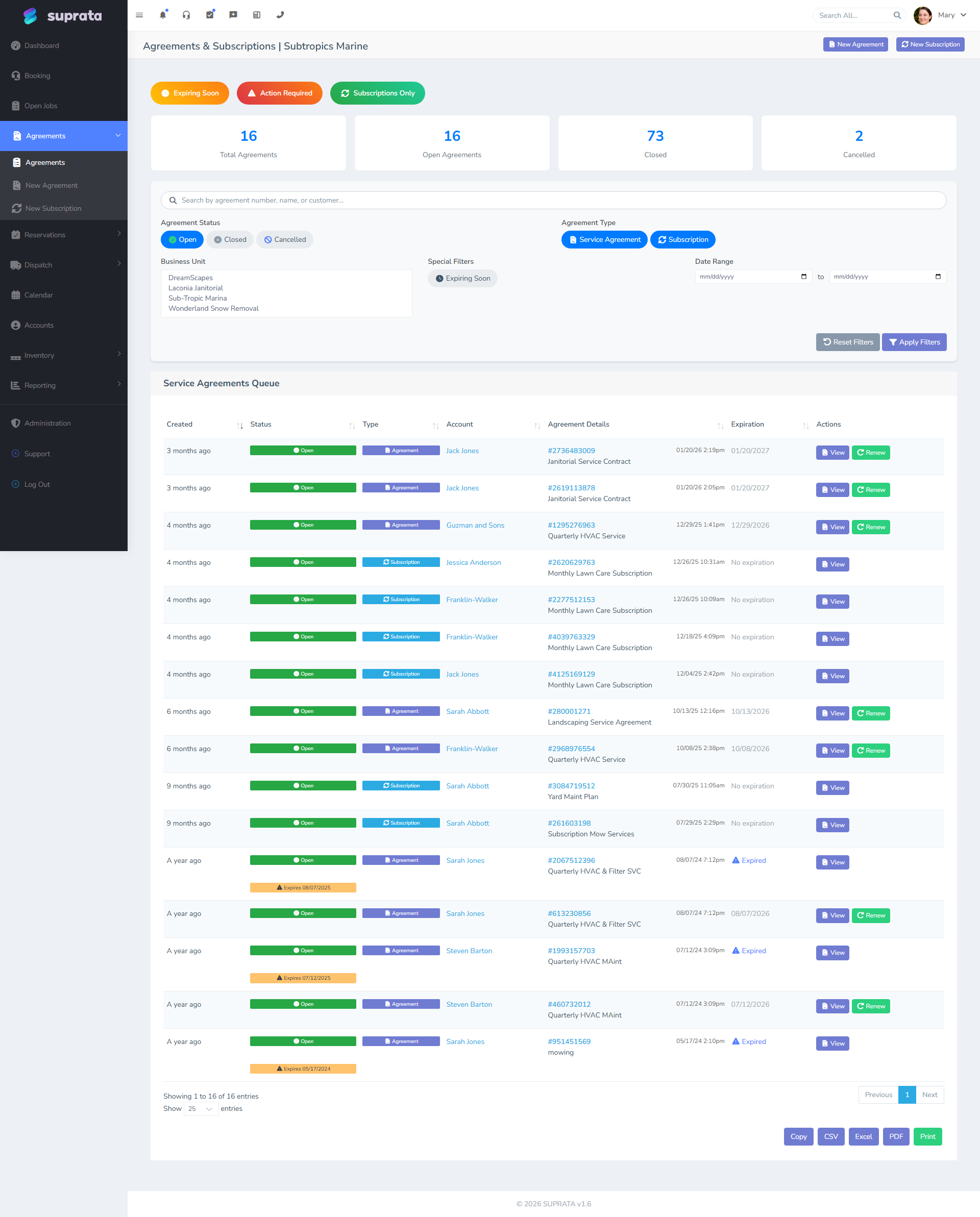
The agreements queue, sorted by end date
The simplest method: open the agreements queue weekly, sort by end date ascending, and look at anything ending in the next 60 days. That's your renewals call list.
Make this a weekly habit — typically Monday morning. Five minutes a week catches every renewal before it lapses.
Automated notifications
Suprata can send reminders to staff (or to the customer) as an agreement nears its end. Configure these in the automation/notification settings. Common defaults:
- 60 days out — internal email to the account manager: "Bob Jim's agreement renews in 60 days, start the conversation."
- 30 days out — email to the customer: "Your agreement renews in 30 days, here's what's included next year."
- 15 days out — internal escalation if no renewal action recorded.
- 7 days out — final reminder.
These are templates; adjust to your business. The point is to catch the renewal before the agreement auto-closes and the customer's program lapses.
What auto-close does
Each agreement has an auto-close date — by default, the start date plus the term length. When that date arrives on an agreement still in "open" status, the system closes the agreement automatically.
Closing means:
- Status flips to closed.
- All schedules under it close (no more ticks).
- The agreement becomes historical.
What auto-close does not do:
- Renew anything. There's no implicit "if no renewal, just keep going" — auto-close ends the program. New work requires a new agreement.
- Notify the customer. That's a separate notification (see above).
- Issue a final invoice or refund. Just ends the recurrence.
If you don't want the customer's service to lapse, you must either renew before the close date or extend the agreement.
The renewal workflow
The typical path, end to end:
Step 1 — Pre-renewal conversation
60 days before end, reach out. Either via the system's automated email or a personal call/email from the account manager. The conversation is:
- "Your maintenance plan ends in 60 days."
- "Here's what you got this year — N visits, X dollars of work covered."
- "Here's what we're offering for next year — same plan / new plan / price update."
- "Want to renew?"
Don't wait for the customer to call you. They won't.
Step 2 — Customer decides
Three branches:
- Renew at same terms. Easiest. Move to Step 3a.
- Renew with changes. Customer wants to upgrade, downgrade, change schedule, etc. Step 3b.
- Decline. Customer is leaving the program. Step 3c.
Step 3a — Straight renewal
Open the customer's agreement. Use the renewal action — typically a "renew" button or a renewal record creation in the agreements area. The system creates a new agreement based on the current one: same template, same items, same schedule, term extended by another year (or whatever your default is).
The new agreement starts when the old one ends, so there's no gap. The customer signs (or accepts via email) and you're done.
The original agreement closes automatically when its end date arrives. The new agreement carries the relationship forward.
Step 3b — Renewal with changes
Same flow as 3a, but on the renewal record, change the terms. Different template (upgrade Bronze to Silver), different schedule (twice yearly to quarterly), different price (annual increase, member discount, etc.).
The customer needs to review and approve the changes — send for re-signature if you take e-signatures. Don't apply changes the customer hasn't agreed to.
Step 3c — Customer declines
Don't renew. Let the auto-close take its course. After close, the customer is off the program; future work is one-off until they decide to come back.
A useful follow-up: tag the customer's account with Lapsed-Plan (or similar) so a future report can pick up "lapsed customers to win back". See Tagging accounts and contacts well.
Auto-renewal vs. opt-in renewal
Two business models:
- Opt-in renewal — the customer must affirmatively renew each cycle. Requires a touch every year. Tends to filter out customers who weren't using the plan; those who renew really mean it.
- Auto-renewal — the agreement renews automatically unless the customer cancels. Higher retention, but legally and ethically requires clear customer notice and an easy cancel path.
Suprata supports both depending on configuration. If you do auto-renewal, make sure your terms-and-conditions text clearly says so, you notify the customer in advance of the renewal charge, and your cancel process is simple. Many states require auto-renewal disclosures; check local law.
The default we recommend for a new agreement program: opt-in renewal with proactive outreach. Higher friction but cleaner relationships and fewer disputes. Move to auto-renewal once your program is mature and your renewal motion is well-defined.
Renewing with a price increase
A common reality: costs go up, you need to charge more next year. How to handle:
- Communicate clearly and early. "Your plan renews next month at $X (up from $Y). Here's why." Customers tolerate price increases far better when they're explained, not surprised.
- Show value. "Last year you got $300 of services for $250. The new price is $275 for $325 of services." Frame the value, not just the increase.
- Grandfather where reasonable. Long-term customers may deserve a smaller increase, or none. Set a policy and apply it consistently.
- Don't quietly auto-renew at a higher price. Even if technically allowed, it generates disputes. Notify and confirm.
Recovery — reviving a lapsed agreement
Customer let the agreement lapse, but came back. Three ways to handle:
- Cleanest: create a new agreement starting today. The lapse period was a real lapse; you don't fake history.
- Backdate the renewal if the customer is willing to pay for the lapsed period (rare, but happens for accounting reasons).
- Treat as one-off if the customer doesn't want to commit again. They're a regular customer now, not a member.
Default: option 1. Clean and honest.
Common mistakes
- No pre-renewal outreach. The agreement closes, the customer notices in three months, you've lost the relationship. The fix is a calendar reminder or automated notification well in advance.
- Auto-renewing without clear notice. Even if legally permitted, surprise renewal charges cost you trust and chargebacks. Notify in advance.
- Renewing with changes silently. "Same plan but $50 more this year" without telling them = dispute. Always communicate changes.
- Letting the renewal create gaps in service. Old agreement ends Dec 31, new agreement starts Feb 15. The customer's January is unscheduled. Make sure renewal start dates align with old end dates.
- Forgetting that closing an agreement closes its schedules. Until a new agreement and new schedule exist, no work is being scheduled. Don't assume "the schedule will keep going" — it won't.
- Manually creating a "renewal" as a brand-new agreement, not linked to the prior one. You lose the customer's tenure history (when did they first sign up). Use the renewal flow so the link is preserved.
- Treating renewals as a billing event, not a relationship event. Renewal is your best chance each year to re-anchor the relationship: confirm contact info, hear about changes, upsell. Don't reduce it to a payment.