Creating a Service Agreement
A service agreement is a commitment: the customer pre-agrees to a program of recurring work — twice-yearly furnace tune-ups, monthly pool service, quarterly pest treatments, weekly mowing — at a defined rate, for a defined term.
It's the difference between selling 100 tune-ups one at a time and selling 50 maintenance plans that produce 100 tune-ups automatically over a year. Same revenue; far less scheduling friction; predictable cash flow; stickier customers. For most service businesses, the agreement program is where the margin lives.
This article covers when an agreement is the right tool, the basic creation flow, and the common ways early agreements go wrong.
When you'd use this
- You do recurring service the same customer needs every N months.
- You want to lock in a customer past a one-time job (improve retention).
- You want predictable revenue and predictable workload.
- You sell maintenance plans, service contracts, or subscriptions.
- The customer asked about a "plan" or "membership".
When you'd not use this
- The work is genuinely one-off (an emergency repair). Don't shoehorn into an agreement.
- You don't yet have a clear, repeatable service program. Define the offering first, then build the template.
- The customer wants flexibility — "call us when you need us, no commitment." That's a customer relationship, not an agreement.
The two-layer model: templates and active agreements
This is the most important conceptual point and the easiest to miss.
- A template is a reusable definition of an agreement program. "Bronze HVAC Plan", "Gold Pool Plan", "Quarterly Pest Service". You build it once.
- An active agreement is one customer's instance of a template. Bob Jim is on the Bronze HVAC Plan; Sarah's Bakery is on the Gold Pool Plan.
When you create the template, you define the rules: items included, schedule cadence, contract length, terms text. When you create an active agreement, you bind a template to one customer for a specific term.
Editing the template later does not change agreements that are already active. When you start a customer on a plan, their agreement copies the template's terms and items as they exist that day — and then it lives on its own. If you change the template's price next year, existing customers stay at their old price until they renew. That's intentional: it keeps the contract you actually signed with each customer locked in.
Setting up — the typical workflow
Step 1 — Build the template (once)
Before you can sell agreements, you build the templates that customers will subscribe to.
You'll need:
- A name and description that's customer-recognizable. "Gold HVAC Plan", not "HVAC-Tier-3-Internal-Code".
- The included items — what the customer gets each cycle. Two tune-ups a year, priority dispatch, 10% off parts, whatever.
- The cadence — how often work or billing happens. Monthly, quarterly, twice a year.
- The default term length — usually 12 months for an annual plan.
- The terms-and-conditions text — what they're agreeing to. This becomes part of the customer-facing contract. Get this right or have your lawyer get it right; it's the only legal document for the relationship.

A template you build hastily on a Tuesday evening will haunt you for years. Spend the time. Build one good template before you build five sloppy ones.
Building one mid-sale. If you're partway through setting up a customer's agreement and realize none of your templates fit, you don't have to abandon it. The agreement builder has a New template option that opens the template form in a side panel — name, length, season, terms, and default items — and drops the finished template straight into the agreement you're building. It's there for anyone allowed to both create and edit agreements. It is a real template, saved for good, so the advice above still applies: name it for the program ("Bi-Weekly Lawn Care"), never for the customer.
The same goes for a line item that isn't on your price list yet. If you manage the price list, the item search in the builder can create it on the spot, and it's added to your price list permanently — not just to this agreement. If you don't have that permission, you'll pick from what's already there; ask whoever manages your price list to add what's missing.
Step 2 — Create the active agreement
Once you have a template, creating an active agreement is fast. The agreement builder walks you through it:
- Pick the customer's account (or create it on the spot).
- Pick the template — or build one, as above.
- Confirm the start date and term length.
- Adjust pricing, included items, or schedule if this customer is non-standard (try to keep this rare — non-standard agreements are hard to track and report on).
- Set the service details and how often the work happens.
- Review and create.
The agreement is now active. The recurring schedule runs automatically; jobs and/or invoices generate per the template's rules.
Step 3 — Decide how they pay
Every agreement gets one invoice for the whole agreement. Right after the agreement is created, the builder asks how the customer is paying for it. It asks then, not earlier, because that's the first moment the real total — tax included — exists.
You have three choices:
- Pay in full now. Charge the whole invoice today to a card or bank account on file, or one you add right there. This is the natural fit for an annual plan sold at a prepaid discount (see the pricing section below): the discount is why they're paying up front.
- Payment plan. Choose how many payments, how often, and when the first one is. The total is split evenly and the last payment picks up the odd cent — $289.98 over 6 monthly payments is six payments of $48.33. The payments are charged automatically on their dates.
- Collect later. The invoice stays open, exactly as if you'd skipped this step. Use it when the customer is paying by check or will pay from the emailed invoice.
A few things worth knowing about plans:
- If the first payment is today, it's charged immediately — and the plan is only set up if it goes through. A declined card leaves nothing half-built; try another card or bank account and carry on.
- Match the plan to the agreement. The builder suggests one payment a month for the length of the agreement. A 12-month plan on a 6-month agreement means the customer is still paying for service that ended months ago — that's a collections problem and a customer-relations problem.
- A plan needs a card or bank account on file. It can't run on "manual payments". If the customer won't store a method, use Collect later.
A card or bank account you add here is saved to the customer's account, just as if you'd added it there. Bank accounts are offered where your payment processor supports them. You need permission to take payments to see this step at all; without it, the builder finishes on the agreement page and payment is handled from the invoice.
Step 4 — Send for signature (if doing e-sig)
If you take electronic signatures, the system can email the customer a link to sign. The customer opens the link, reviews the terms, signs on a signature pad in the browser, and the signed agreement is captured back to your system.
Two things:
- The signature link is a public token (no login required). Don't share it past the customer.
- After signing, the agreement is locked in legal terms. Edits after signing should be exceptional.
If the customer signs a paper contract instead, note on the agreement that the signed copy is on file — and file it somewhere you'll find it in two years.
Step 5 — Verify the first cycle
Don't trust the schedule until you've watched it produce work once. Two weeks before the first scheduled tick:
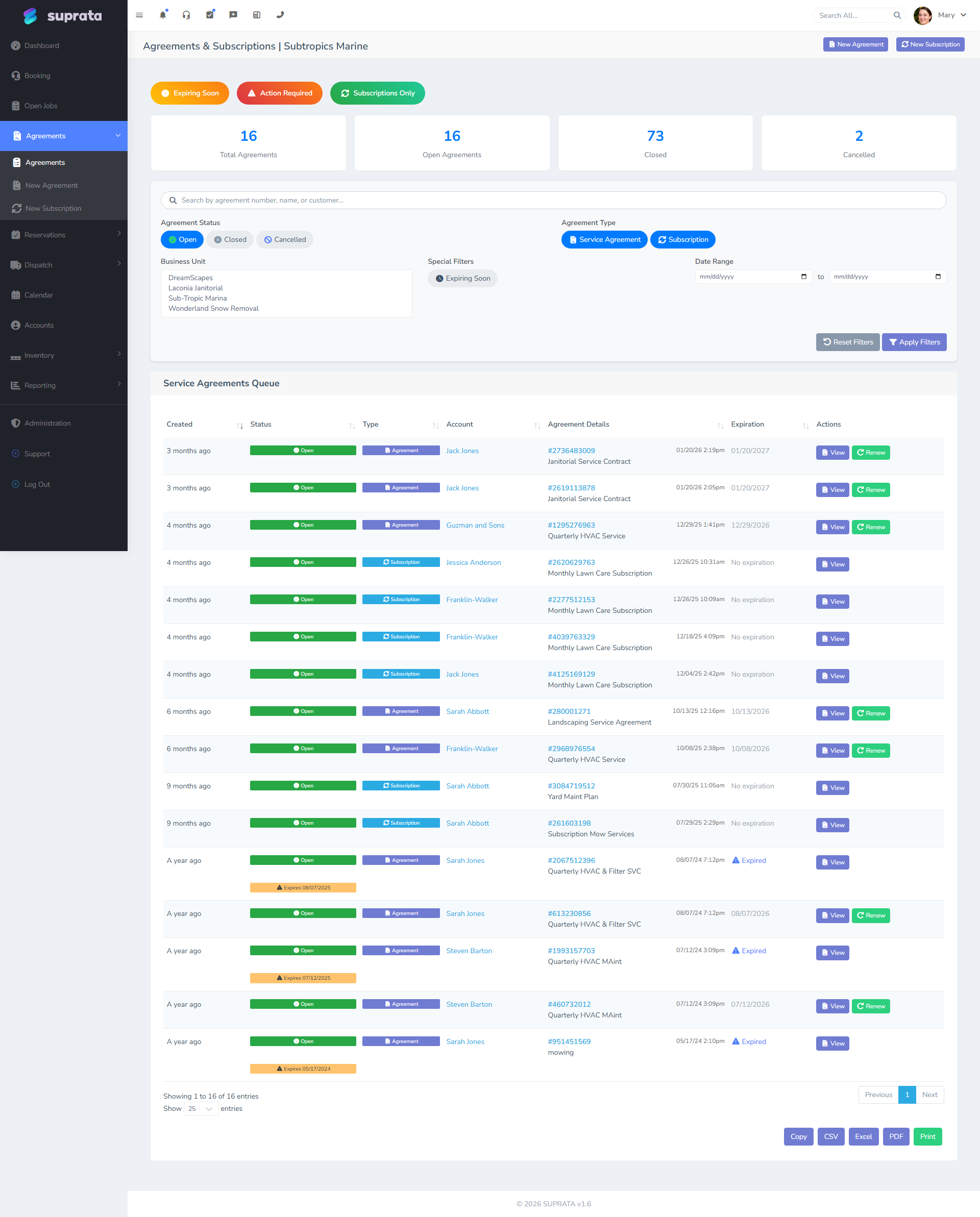
- Check that the agreement appears in the agreements queue.
- Check that the schedule is correctly entered (right dates, right items).
- When the first job is auto-created, verify it landed correctly.
- When the first invoice generates, verify the line items and amount.
- If you set up a payment plan, check that the first automatic payment actually landed on the invoice. A card that expired or a bank account that was closed shows up here, not at signup.
Catching a misconfigured template at the first cycle is a five-minute fix. Catching it at month six means cleaning up six bad cycles.
Pricing the agreement — the strategic decision
This is where most agreement programs live or die. Cheap enough to sell, expensive enough to be worth running. Some defaults that work:
- Annual price = the cost of doing the work, minus margin you'd give for upfront commitment. A two-tune-up plan that retails at $150 each ($300 total) often sells as a maintenance plan at $250 prepaid. The customer saves $50; you save the marketing/scheduling cost of selling them twice.
- Recognize the value of priority dispatch and member-only discounts. Beyond the bare service, members get faster response and 10% off parts. Price the membership accordingly.
- Don't underprice. A plan that breaks even on labor with no margin is a marketing expense, not a profit center. Make sure each agreement contributes margin.
Subscription mode vs. job-producing mode
Suprata supports two flavors of agreement, depending on what you're selling:
- Job-producing agreements — the schedule creates jobs. Used for plans where you do physical work on a recurring cadence (HVAC tune-ups, pest control, lawn care).
- Subscription agreements — the schedule produces only invoices, no jobs. Used for pure subscriptions: software access, monitoring, retainer-style services where there's no per-cycle visit.
The choice is set on the template. Most maintenance plans are job-producing. A few specialty offerings (remote monitoring, insurance-style retainers) are subscriptions.
For more on the schedule mechanics, see Recurring schedules on agreements. For pure billing-cadence cases, see Recurring invoices.
Common mistakes
- Editing the template thinking it'll update active agreements. It won't. Each active agreement keeps its own copy of the terms it was started with. To change everyone's terms, edit the template and go visit each affected active agreement.
- Creating a template per customer instead of one template, many customers. "Bob Jim's HVAC Plan" as a template is wrong. The template is "HVAC Bronze"; Bob Jim's account holds a Bronze instance. One template per program, not per customer. Being able to build a template from inside the agreement builder makes this easier to slip into — if the customer is only slightly different, adjust the items on their agreement instead.
- Picking "Collect later" out of habit. The best moment to settle how an agreement gets paid is while the customer is still in front of you. "Later" turns into an open invoice somebody has to chase.
- Running a payment plan longer than the agreement. Twelve monthly payments on a six-month agreement means billing a customer for service that has already ended. Keep the plan inside the term.
- Skipping the terms-and-conditions text. That blob of text is the legal contract. The default placeholder text is not adequate for a real customer relationship. Replace it with real terms reviewed by someone who understands them.
- Auto-billing the full year on day one when the work spreads across the year. That's allowed but creates accounting weirdness — the income hits one period, the work hits twelve. Consider matching billing to delivery (quarterly billing for a quarterly plan) or use deferred-revenue handling.
- Not pricing for margin. A $99 annual plan that delivers $300 of services is great marketing and bad business. Math it out before launching.
- Letting active agreements drift past their end date with no renewal action. When the auto-close runs without a renewal in place, the customer just falls off the program — no further work, no notice. See Agreement renewals.
- Manual one-off agreements with no template. Tempting for the "weird customer" but expensive — every odd agreement is unreportable and unpredictable. Build a template even if it'll only ever apply to one customer; you can name it appropriately.
- Not watching the first cycle. A schedule will produce exactly what you set up, not what you meant to set up. Watch the first cycle from start to finish before you trust it on autopilot.