Estimates vs. invoices — when to use which
In Suprata, an estimate and an invoice carry the same kinds of line items and the same tax setup — but they behave completely differently once they're out the door. An estimate is a proposed price waiting for the customer's approval; an invoice is a bill you're collecting on. Whether the document counts as revenue, ages on your A/R report, or can be paid online comes down to which one you issued.
That makes the decision more consequential than it looks. This article covers when to use each, the typical estimate-to-invoice flow, and the mistakes that cost the most.
The short version
- Issue an estimate when the customer hasn't yet committed to the work and you need to give them a price to consider.
- Issue an invoice when the customer has agreed (verbally, by signature, or by acceptance) and you're billing for work done or about to be done.
- An estimate does not count as revenue, hit your A/R, sync to QB as an invoice, or generate payment requests.
- An invoice does all of those things.
- You can convert an estimate into an invoice when it gets approved — no re-keying.
When estimates make sense
A few scenarios:
- Bid jobs. Customer asked for a price; they may or may not say yes. Send an estimate.
- Repair quotes. Tech diagnosed; needs sign-off before parts are ordered. Send an estimate.
- Comparison shopping. Customer wants a written number to compare against another vendor. Send an estimate.
- Approval gates. Some commercial customers require a written estimate signed before any work proceeds (it's a procurement-policy thing). Send an estimate.
- Recurring contract pricing. You're proposing terms for a service agreement. Estimate first; the agreement gets created from it on approval.
Estimates can also capture customer signatures (digital), have an expiration date, and be re-sent for re-approval when conditions change. To give the customer a choice of two, three or more priced options on one page, with a deposit collected when they accept, send a Good / Better / Best proposal.
When invoices are right immediately
- Time-of-service work. Tech finished, customer is standing there with a credit card. Skip the estimate, issue an invoice, take payment.
- Standing customers with established terms. Net-30 customer who you do recurring work for — you don't quote, you bill.
- Service-call diagnostic fees. Your "we showed up" charge is fixed and not in question. Bill it.
- Mid-job add-ons that fall under the customer's pre-approved scope (like an agreed hourly rate). Add to the existing invoice rather than creating a new estimate.
If you find yourself routinely issuing estimates after the work is done, you're probably using estimates as a "draft invoice" — there's a separate concept for that (the Draft invoice state, which is editable but not yet sent). Use draft invoices, not estimates, for that purpose.
Where invoice and estimate behavior diverges
Same line items, same totals, but different downstream behavior:
| Aspect | Estimate | Invoice |
|---|---|---|
| Counts toward revenue | No | Yes (when closed) |
| Appears on A/R aging | No | Yes (until paid) |
| Customer can pay it online | Typically no | Yes |
| Syncs to QuickBooks | Usually no (some configs sync them as Estimates) | Yes |
| Sets a due date | Optional | Yes (per terms) |
| Can capture customer signature | Yes | Yes (less common) |
| Has an expiration date | Yes | No (only a due date) |
| Can be converted | → Invoice (built-in flow) | Cannot become an estimate again |
The terms catalog — and why estimates have their own terms
Suprata maintains one catalog of "Invoice Terms" that defines reusable label/policy bundles like "Net 30", "Due on Receipt", "30-Day Estimate", etc. Each term is flagged as either estimate-applicable or invoice-applicable.
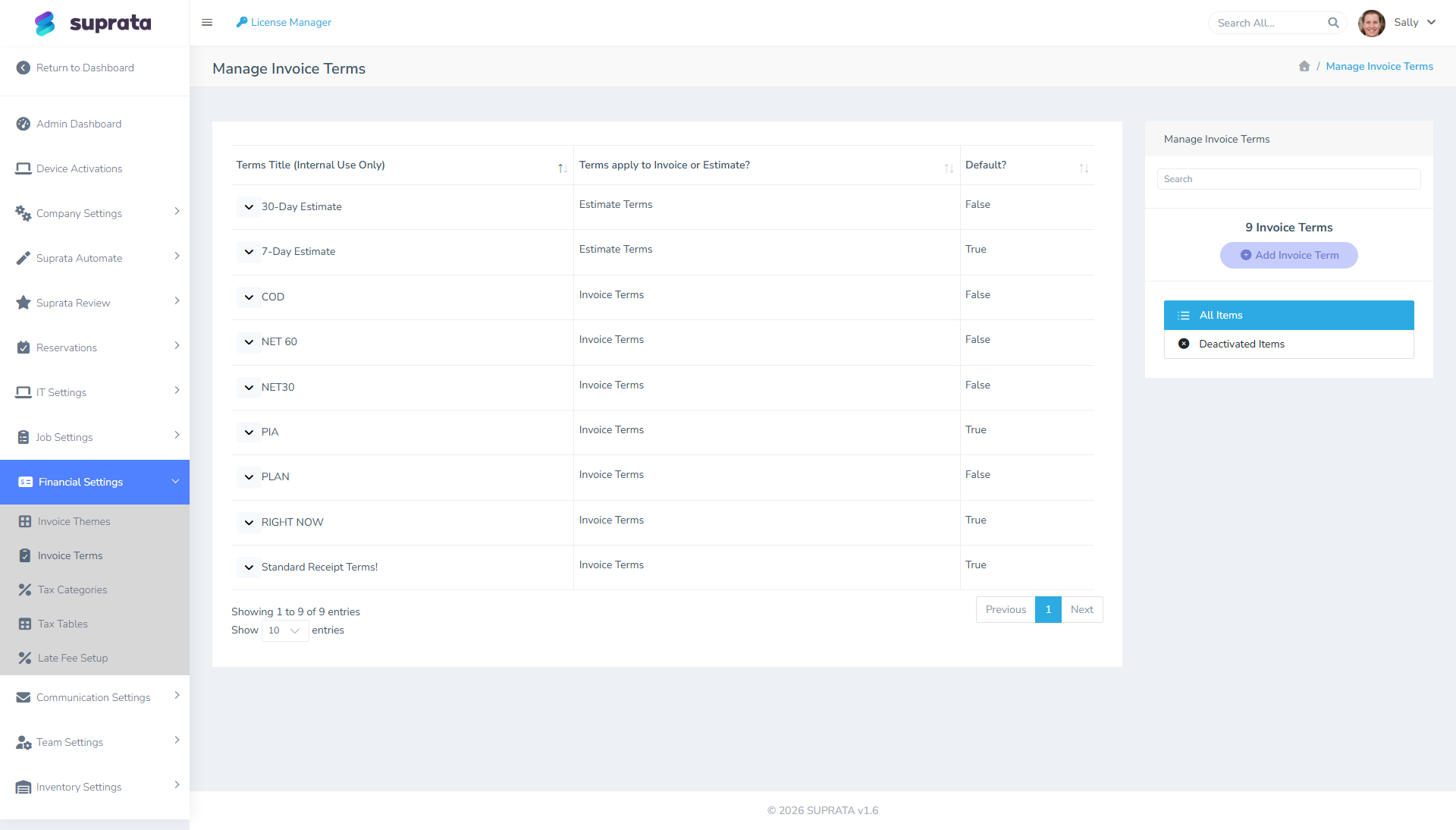
Sidebar: Administration → Billing & Payments → Invoice Terms.
You can pick which set of terms is the default for new estimates and which is default for new invoices. The estimate defaults are usually about expiration ("This estimate is valid for 30 days") rather than payment ("Net 30").
The split matters because it sets customer expectations on the document itself. The terms text appears at the bottom of every estimate/invoice PDF and email — keep them aligned with how you actually run your business.
The typical estimate → invoice flow
How a quote gets turned into a real bill, end to end:
- Create an estimate for the customer. Add line items as you would for an invoice. Set an expiration appropriate to the work.
- Send the estimate to the customer (email, with the PDF attached or with a link to view-and-approve online).
- Customer reviews and approves — either by hitting an "Approve" button on the public link (digital signature is captured) or verbally/in writing. If they approved verbally, mark it Approved manually with a note recording how.
- Convert the estimate to an invoice — there's a "Convert to Invoice" action on the estimate. The system creates a new invoice with the same line items, links it back to the original estimate, and updates the estimate's status to "Converted".
- Do the work (or, for in-progress work, mark the existing job complete which generates the invoice automatically from job line items).
- Send the invoice to the customer. Take payment.
- The original estimate stays in the system as historical record. You can still reference it, but it's archived from the active estimate list.
When to skip the estimate
Three judgment calls:
- Repeat customers under established terms. No need for an estimate ritual every time. If they're a Net-30 customer who you do regular work for, just invoice.
- Small ticket items below your "we just bill it" threshold. If a $75 service call is below the dollar amount you'd bother quoting, bill it.
- The customer specifically asked for an invoice instead of an estimate. Some commercial customers want to skip the estimate phase to streamline their AP. Honor that — if they need an estimate later for procurement reasons, you can always print one.
Common mistakes
- Using "Estimate" as a synonym for "Draft Invoice". They're different. A draft invoice is an unfinished invoice; an estimate is a quote. If you mark something as Estimate but never convert it, your A/R reports won't capture the eventual revenue.
- Forgetting to convert. You sent the estimate, the customer approved it, you did the work — and you never converted it to an invoice. Now there's nothing on your A/R, the customer hasn't been billed, and you're missing revenue. Set a personal habit: convert at job-completion time, not "later".
- Editing the estimate after conversion. The converted estimate is locked. If you change line items, change them on the resulting invoice, not the original estimate. The estimate is the historical record of what was agreed.
- Issuing an estimate for work you're billing today. Estimates aren't payable. If a customer is standing in front of you with a credit card and you hand them an estimate, they can't pay you online from it. Issue the invoice.
- Letting estimates pile up unconverted. A bucket of "approved but unconverted" estimates is hidden A/R. Run the unconverted-estimate report periodically and clear it.
- Charging a deposit on an estimate by hand. You can't take payment on an estimate itself. Send it as a proposal instead: when the customer accepts online, Suprata creates the deposit invoice from your job type's rule (a percentage, a fixed amount, or paid in full) and takes them straight to pay it. The final invoice then takes the deposit off automatically.
A worked example: a multi-day repair
A boat owner asks for a repair quote. Here's how the documents flow:
- Tuesday — Tech does an on-site diagnostic. Sally creates an estimate for $2,400 (parts + labor), expiration 30 days, terms "30-Day Estimate". Sends it to the owner.
- Friday — Owner clicks "Approve" on the public link. Estimate status flips to Approved.
- The following Monday — Sally converts the estimate to an invoice. The new invoice has the same $2,400 in line items, terms switch to "Net 15", linked to the original estimate.
- Tuesday-Thursday — Tech does the work over three days, logs time, adds an extra $200 part that wasn't in the estimate (with owner's verbal OK). The invoice is updated.
- Friday — Job marked complete. Invoice now reads $2,600 (the original $2,400 + $200 for the added part). Sally sends the final invoice; owner pays online via the link.
- Saturday — Payment hits. Invoice closes. QB sync (if connected) pushes the invoice and the payment to the books.
The estimate and invoice are both in the system, both findable, both linked.