The Public Waitlist
When customers can't book because you're full — every slip sold, every site occupied, every storage unit taken — the easy answer is "sorry, we're full." The better answer is to capture them on a waitlist so when an opening occurs, you can fill it with someone who already wanted to be there.
The Reservations system has a public waitlist that integrates with the booking flow. When availability searches return empty, customers can opt in to be notified when something opens up.
When you'd use this
Run a waitlist when:
- You regularly run at full capacity — peak season for marinas, all year for high-demand storage facilities, holiday weekends for campgrounds.
- You have predictable turnover — monthly tenants leave, slips become available — and want to fill openings quickly without marketing from scratch.
- You want to measure unmet demand: how many people wanted what you couldn't sell? Is that growing? Should you expand?
- Your industry expects a waitlist — many established marinas have years-long waitlists that are part of their brand.
Skip a waitlist if you have ample capacity year-round and turnover is rare; it'll just sit empty.
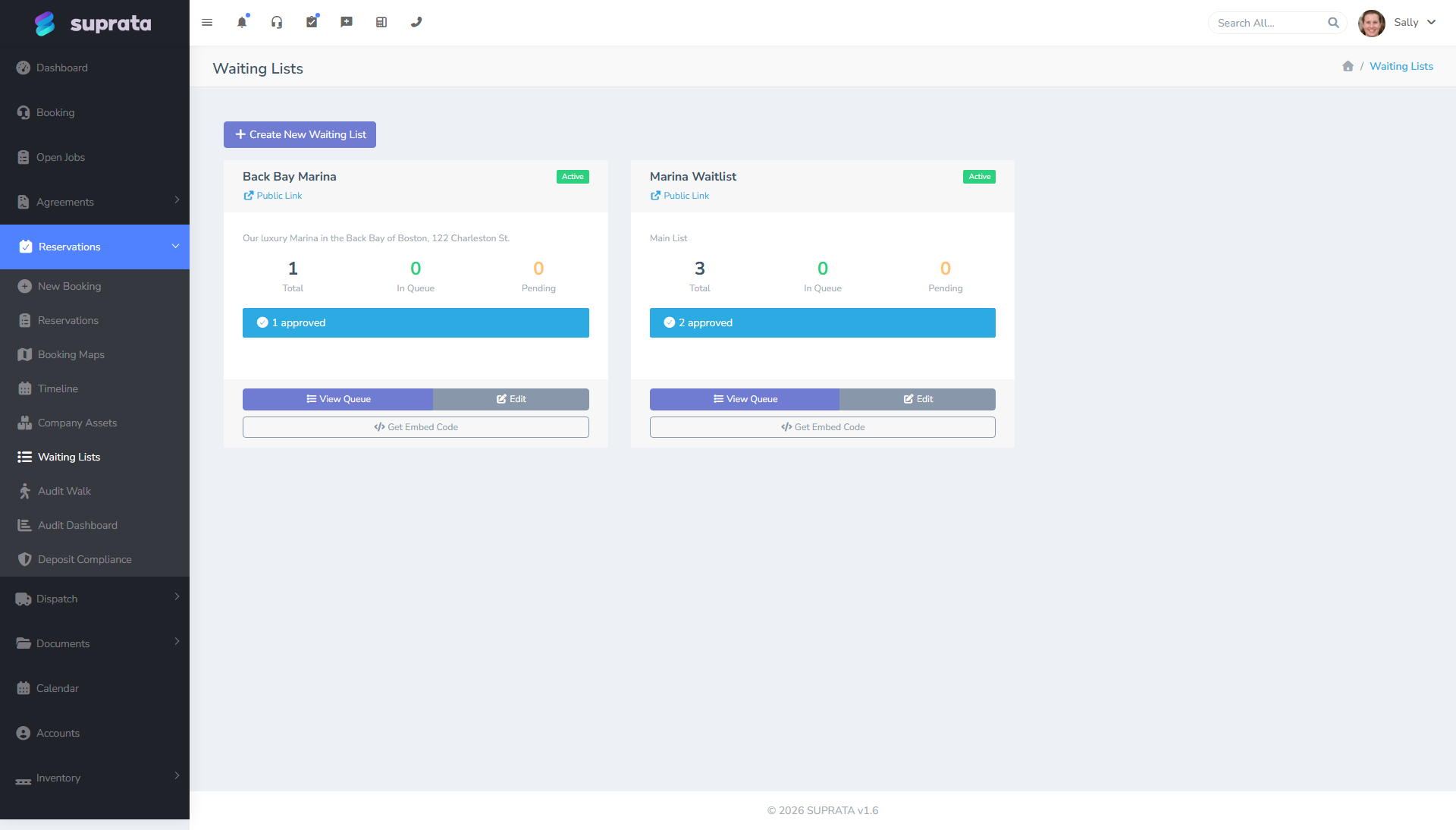
How the waitlist fits with the booking system
The waitlist has its own area of Suprata — see the dedicated waitinglist category for full details — but it ties into Reservations at three points:
- Public capture. When a customer searches public availability and finds none for the asset type and dates they want, the page offers a "join the waitlist" form. They submit name, contact info, what they wanted, and how flexible they can be on dates.
- Internal admin. Staff have a waitlist admin screen showing who's on the list, when they joined, what they wanted, and how long they've been waiting.
- Conversion to booking. When availability opens up (a tenant moves out, a reservation cancels), staff can convert a waitlisted entry directly into a booking — pre-filling customer info into the booking wizard.
Running the waitlist well
A waitlist is only useful if you actually use it. Common neglect patterns:
- The waitlist accumulates entries but staff never check it.
- Staff check it but don't follow up with customers when openings occur.
- Customers join the waitlist, hear nothing for months, and conclude the operation is disorganized.
To run it well:
Build a routine
Decide who owns the waitlist and on what cadence they review it. Daily during peak season; weekly off-season is fine. The owner's job is to:
- Reach out to entries that have been waiting a long time (clear stale ones, re-engage active ones).
- Match new openings to the queue and make offers.
- Keep the data accurate (close out entries when filled or when the customer says they no longer want it).
Communicate proactively
A customer who joins your waitlist deserves a confirmation email immediately ("you're on the list, position #12") and periodic updates ("still no openings, you're now #8"). Most operators think about the waitlist as an internal list; the customers see it as their reservation request. Treat it as such.
Make offers with a deadline
When you have an opening, contact the next waitlister and give them a deadline to accept (e.g., 48 hours). If they decline or don't respond, move to the next entry. Without a deadline you'll spend two weeks playing phone tag while the slip sits empty.
Be honest about position and timing
If the average wait for a wet slip at your marina is 18 months, tell people that when they join. False hope ("we'll let you know soon!") generates angry customers when the reality (no openings for a year) hits. Honest expectations create loyal waitlisters.
Recommended defaults
- Send an automatic confirmation when someone joins. Set their expectations on what to expect next.
- Review the waitlist at least weekly during off-peak and daily during peak.
- Quarterly cleanup: contact long-waiting entries, ask if they're still interested, close out anyone who isn't.
- Notice how often waitlisters actually become customers. If almost none of them do, the form is collecting noise — tighten the questions or stop offering it. If a lot of them do, you have more demand than inventory and that's a real signal worth acting on.
- Do not over-promise. "Sorry, we're full but here's the waitlist if you'd like" is honest. "We'll definitely have something for you soon" almost certainly isn't.
Order of priority — first come first served, or something else?
The default approach is first-come-first-served by date joined. That's fair and easy to defend to customers. Some operators add tiered priorities:
- Existing tenants wanting to upgrade to a different asset type get priority.
- Annual lease holders get first refusal on openings before transients.
- Members of a yacht club or RV club get a private waitlist that fills first.
These are valid policies but publish them. "First come first served, except for current tenants" needs to be in writing. Hidden tiers cause arguments.
Common mistakes
- Letting the waitlist accumulate without working it. A waitlist nobody touches is a customer-relationship liability. If you can't commit to working it, don't run it.
- No automatic confirmation when someone joins. Customers wonder if their entry was received. They submit again. Now you have duplicates.
- Calling waitlisters in random order. If you skip the person who's been waiting a year and call the person who joined last week, the year-waiter (when they find out) becomes an angry ex-customer.
- No deadline on offers. "Let me know when you're ready" turns into weeks of dead air; the slip sits empty.
- Not closing out filled or no-longer-interested entries. The waitlist counter inflates, the data becomes meaningless.
- Promising specific timing you can't keep. "We'll have something for you in 2 months" had better be backed by data, not optimism.
- Failing to record why someone joined. Knowing they wanted "any 30-foot wet slip with finger pier" is useful when you have an opening; knowing they joined "for a slip" isn't.
- Not paying attention to who's on the list. The waitlist tells you who wanted to do business with you and couldn't. Ignoring it means missing out on customers who already raised their hands.
Related articles
- Handling conflicts and double-bookings
- The booking wizard walkthrough
- Setting up asset types
- Calendar and timeline views
- (See also the dedicated waitinglist category for the full set of waitlist articles.)