Setting Up Suprata for an IT Shop
IT and computer-repair businesses share most of their setup with general service companies, but they have a few distinctive needs:
- In-store ("bench") jobs alongside on-site jobs — the customer drops off equipment.
- Equipment intake — capturing what came in, what's wrong, what was approved for work.
- Parts inventory tracking for things like RAM, drives, screens.
- Managed-service billing — flat monthly fees for ongoing IT relationships.
This guide covers the deltas. Read Setting up Suprata for a service business first as the baseline; this article assumes that background.
The two main job patterns
In-store / bench jobs
Customer brings something in. You diagnose, quote, repair, customer picks up. The job is "open" the entire time the equipment sits in your shop, regardless of who's actively working on it.
Key characteristics:
- Often no appointment — the work happens whenever your bench tech gets to it.
- Equipment intake form at drop-off captures specs, condition, customer's stated problem, and any approval.
- Status changes drive customer notifications: "diagnostics complete", "approval needed", "ready for pickup".
In-field jobs
You go to the customer's home or office. Same as a typical service-business job.
Key characteristics:
- Always has an appointment.
- May involve client equipment that's being serviced in place (a server in their rack, a PC at their desk).
- Equipment intake is less formal — usually no drop-off paperwork.
Set up both patterns; most IT shops do both.

Day 1 — Foundation
Same as the service-business guide:
- Company settings, timezone, logo.
- User accounts for techs and front-desk staff.
- Tax setup.
- Job types: Bench Repair, In-Store Diagnostic, On-Site Visit, Remote Support, New System Build, Recurring Maintenance (if you do MSP work).
Day 2 — Pricelist and equipment forms
Pricelist priorities for IT
Common items:
- Bench labor rate — per hour or per job.
- On-site labor rate — usually higher.
- Remote support hourly.
- Diagnostic fee — often $49–$99, sometimes credited toward the repair.
- Common parts: SSDs, HDDs, RAM kits, power supplies, fans, screens for laptops.
- OS install / re-install fee.
- Data recovery — wide range; have one or two tier prices.
- Virus removal / cleanup.
Equipment intake forms
The seeded Computer Evaluation form covers PC bench intake — make/model, serial, customer's stated issue, condition at drop-off, accessories included, password (if customer provides), data backup status, approval status. Use it as-is to start.
The IT Equipment family of forms covers managed-services-style equipment tracking — assets the customer owns that you're responsible for keeping running. Use these if you do MSP-style work where you need an inventory of every server/workstation/router under contract.
For the intake form to attach automatically when a "Bench Repair" job is created, link the form to that job type. Then your bench tech can fill it in directly on the job.

Day 3 — Operations
Bench workflow
Build a status flow that matches your bench:
- Received — equipment in, intake form completed, awaiting diagnostic.
- In Diagnostic — tech is investigating.
- Awaiting Approval — diagnosed, quote sent, waiting for customer to approve.
- In Repair — approved, work in progress.
- Awaiting Parts — work paused for parts.
- Ready for Pickup — done, customer notified.
- Picked Up / Closed — out the door.
These can be subset of your standard job statuses or job-type-specific. Most shops use the regular statuses with notes for approval state, since adding too many statuses fragments your reports.
Customer notifications
Configure SMS/email templates for the bench workflow:
- Drop-off confirmation with a tracking link or a job number.
- Diagnostic complete with the quote.
- Ready for pickup when complete.
These are the differentiator for a bench shop — customers don't know what's happening with their device, and SMS updates dramatically improve satisfaction.
Dispatch (less central than a service business)
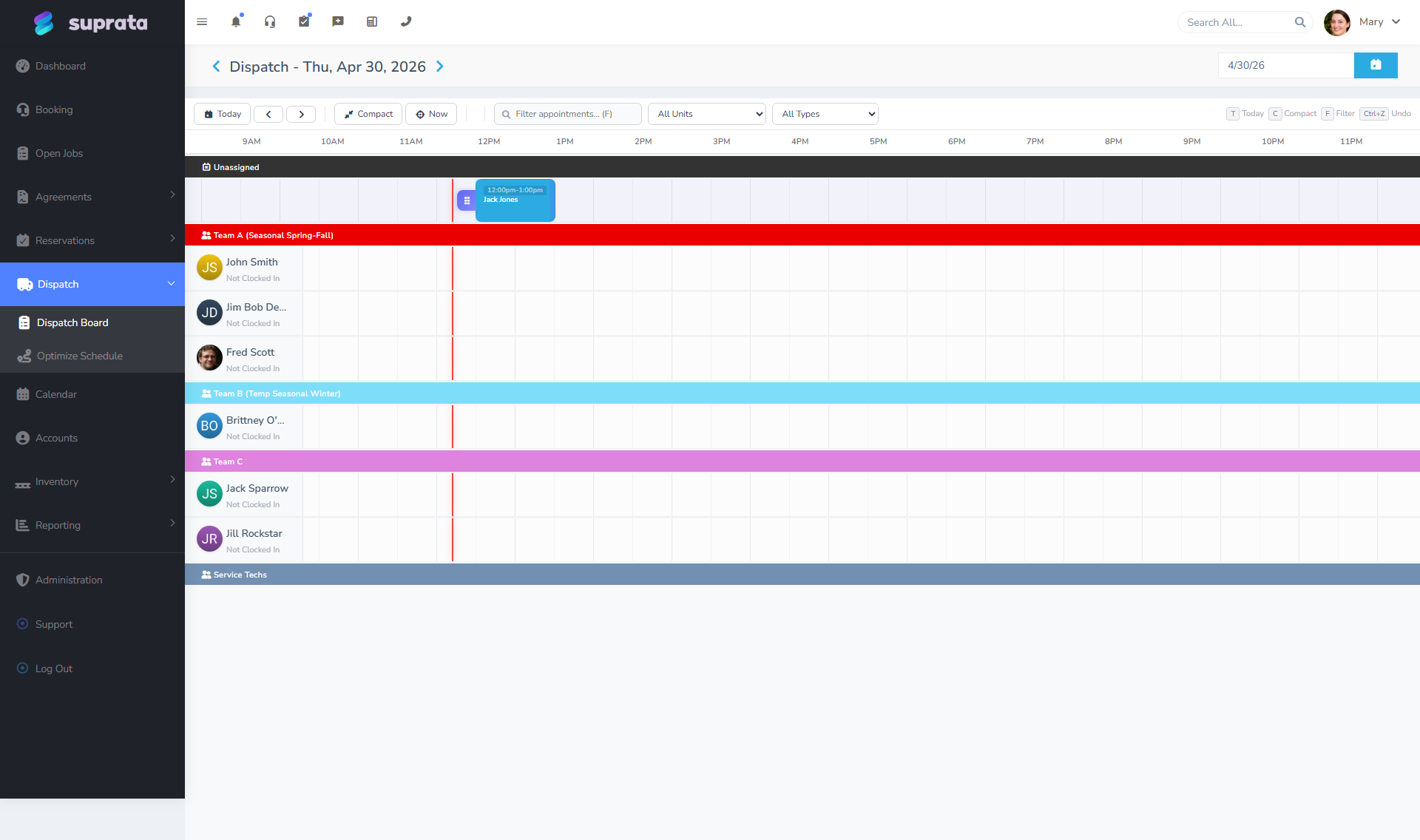
For an IT shop, the dispatch board is mainly for in-field jobs. The bench work doesn't need scheduling — it goes onto a "bench queue" view filtered to bench job types. Build that view once and let your bench tech work from it.
Day 4 — Inventory (if applicable)
Parts inventory
If you stock common parts (RAM, drives, screens, PSUs), set up:
- Vendors — your typical suppliers (Newegg, Ingram, local distributors).
- Warehouses — typically just one ("Main Shop").
- Stock items in inventory matching pricelist items, with quantity-on-hand.
When a part goes onto an invoice, the inventory drops. Restock by recording shipments. The cost of goods reports keep your margin honest.
If you don't stock — you order parts per-job — skip this and just use pricelist items without inventory tracking.
Tracking customer-owned equipment
For MSP customers, capture each piece of equipment under your management. Use the IT Equipment forms — one per server, workstation, switch, etc. This becomes your "what's at this customer" reference and ties service history to specific equipment over time.
Day 5 — Managed services and recurring billing
If you do MSP-style flat-fee management:
- Build a subscription for each managed-service tier ("Basic Monitoring", "Full Managed Services", etc.).
- Activate the subscription on each customer at their tier.
- Configure autopay so monthly fees draw automatically.
If you do block-hour support (customer prepays X hours/month, used as needed):
- This is closer to a recurring invoice with hour tracking on jobs.
- Bill the block monthly via a recurring invoice.
- Track hours used on the regular timeclock or job time entries.
- Send the customer a monthly summary of hours used.
If you do per-incident:
- No recurring billing. Each ticket becomes a job, billed at completion.
- Some IT shops bundle a small monthly fee for "monitoring" plus per-incident billing — a subscription + ad-hoc invoices.
See Subscriptions vs. service agreements vs. recurring invoices for the full picture.
Day 6 — Communications and remote-work hooks
Remote support sessions
If you provide remote support, it doesn't change Suprata setup much — the job type is "Remote Support" and time is logged against the job. The actual remote tool (TeamViewer, Splashtop, Anydesk) lives outside the system. You may want to put a link to your remote tool in the customer email template so they can launch a session quickly.
Technical-customer expectations
IT customers often expect more than residential service customers — they read the technical detail on their invoices, they want clean line items ("Replaced WD Blue 1TB SSD with Crucial MX500 1TB"), they expect status updates. Lean into this; keep your line item descriptions specific.
Day 7 — Test and go live
Real dry run:
- Walk-in bench job: receive equipment, intake form, status updates, completion, pickup.
- On-site small job: scheduled, tech goes out, parts and labor billed, invoice sent.
- MSP monthly run: subscription invoice fires, autopay charges, customer gets receipt.
Common mistakes
Treating bench jobs like service-call jobs. They don't have appointments. They don't follow a typical "scheduled → in progress → complete" flow. They sit on the bench until the tech gets to them, with state changes driven by status updates instead of calendar events. Build a bench-specific view in dispatch and don't try to put bench jobs on the calendar.
Not capturing equipment specs at intake. Three weeks later when the customer asks about their drop-off, you don't remember what came in. Make the intake form mandatory.
Not billing for diagnostic on declined work. The customer brings it in, you spend an hour diagnosing, they decline the repair, you eat the diagnostic time. Charge a diagnostic fee that's clearly disclosed at drop-off, credited toward the repair if approved.
Letting MSP customers slowly grow their footprint without billing more. They added five workstations and a server six months ago and you're still billing the old contract amount. Track equipment under contract structurally; review quarterly.
Confusing service agreements with subscriptions for MSP work. MSP "we monitor your stuff" is a subscription (no jobs auto-generated). MSP "we visit quarterly for proactive maintenance" is a service agreement with scheduled visits. Many MSPs mix both — a subscription for the monitoring, an agreement for the quarterly visit.
Forgetting to track parts cost on bench jobs. Margin matters. If you don't capture cost-of-goods on the parts you put into a customer's machine, your reporting tells you you're more profitable than you are.