Recurring Appointments
A lot of service work isn't one-off — it's a rhythm. Quarterly HVAC maintenance. Weekly lawn service. Bi-monthly pest control. Annual chimney inspections. Setting up each of these as a fresh appointment every time is busywork that wastes the dispatcher's day. Recurring appointments turn the rhythm into a series the system manages for you.
This article covers how to set up a recurring series, the important difference between editing one visit vs. the whole series, when recurring appointments are the right tool vs. when a service agreement is, and the mistakes that turn a "save me time" feature into "why is the calendar full of phantom appointments?"
When you'd use this
- A maintenance contract requires regular visits (weekly, monthly, quarterly).
- A customer wants a recurring lawn-care or pool-service visit.
- An internal task happens on a schedule (tech meeting every Monday morning, equipment audit every quarter).
- You're servicing a multi-site customer where each site needs the same recurring visit.
- You want appointments to auto-populate the calendar so dispatch isn't manually creating them.
When not to use it
- The schedule is loose ("we'll check in sometime next month") — make a single appointment when it's actually time.
- Each visit involves billing that varies a lot — a service agreement is probably a better fit (see When recurring appointments meet service agreements below).
- The customer-facing relationship is contractual with renewals and pricing tiers — that's an agreement, and the appointments fall out of the agreement.
How to think about it — the series and the individual visits
Two layers:
- The series — the rule. "Every other Tuesday at 10 AM, 60 minutes long, tech Carlos, customer Smith, type Maintenance Visit, indefinitely (or until 2027)."
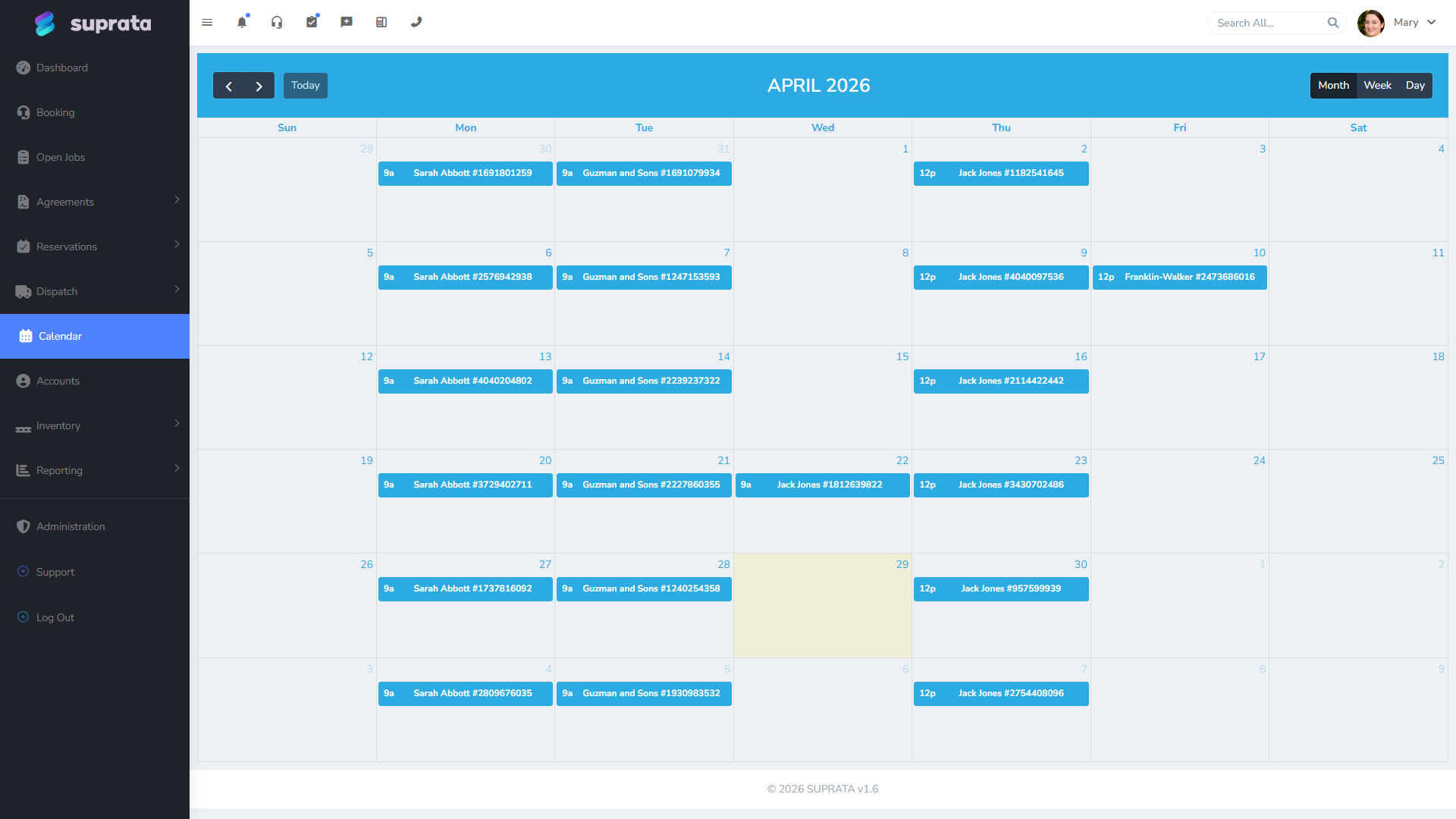
- The individual visits — the actual appointments the rule generates. Each one is a real appointment on the calendar that you can edit, reschedule, or cancel like any other.
Suprata generates a window of upcoming visits ahead of time (typically the next 12) and adds more as time goes on. So:
- Future visits show up as real appointments you can see, edit, and dispatch like any other.
- The series rule itself is separate — it's what knows "after the last generated visit, add 12 more starting in three months."
When you edit one visit, you're editing that single appointment. When you edit the series, you're editing the rule, and usually all future visits get rebuilt from the new rule. That distinction matters every time you make a change.
Setting up a recurring series
The recurring controls live on the appointment creation/edit screen (look for "repeat" or "recurrence" — the label varies by account). For each series, you choose:
- Frequency — daily, weekly, every-other-week (bi-weekly), monthly, quarterly, yearly, or a custom pattern (e.g., "every third Tuesday").
- Start date — when the first visit happens.
- End condition — never (open-ended), after N occurrences, or by a specific date. Most maintenance is "never" or "after 12 occurrences" (a year of monthly visits).
- Tech assignment — usually the same tech every time, but some accounts let you rotate through a team.
- Job link — many recurring appointments link to a recurring job, so each visit produces its own job record. See Creating your first job.
- Tags and notes — apply across all visits unless you override them on a single visit.
Save and the system generates the first batch of visits. They appear on the calendar and dispatch board immediately.
Editing one visit vs. the entire series
This is the single most important decision in the whole feature, and the source of about 80% of the "the system did something weird" calls around recurring appointments.
When you open a recurring visit and change something — date, time, tech, summary — Suprata prompts you with two (or three) options:
- Just this one — change applies to this visit only. The series rule is untouched. The next visit reverts to the series defaults.
- All future visits — change applies to this visit and every one after it. The series rule updates.
- All visits (sometimes offered) — change applies to past, present, and future. Use this rarely — rewriting history is usually wrong.
The right answer depends on the situation:
- A one-time conflict ("Carlos is out next Tuesday, send Maria for that one visit") — Just this one.
- A permanent pattern change ("from now on, the visit moves from Tuesdays to Wednesdays") — All future visits.
- Fixing a tech assignment going forward ("Maria is taking over this customer permanently") — All future visits.
- A typo in the summary ("the original series said 'maintenence', fix to 'maintenance'") — All visits is fine; you're not rewriting history, just spelling.
If you're not sure which to pick: "Just this one" is the safer default. You can always come back and apply the change to the series later. Going the other way ("oops I changed all of them, I meant just one") is a much harder cleanup.
Skipping visits and one-off cancellations
A customer doesn't want this month's visit. The right move is to cancel the single visit, not the whole series. Cancelled visits stay on the record and the series continues on its normal cadence.
If a customer wants to pause the series (e.g., snowbird going north for the summer), you can usually mark the series paused and resume it later. If that's not available, the workaround is to cancel each upcoming visit one at a time — tedious, but workable.
If a customer wants to end the series, edit the series and set the end date to the next occurrence (or set "after N occurrences" to the count you've already done). This stops generating future visits without deleting the history.
When recurring appointments meet service agreements
Recurring appointments and service agreements solve overlapping problems but from different angles:
- Recurring appointments are about the schedule. They populate the calendar and dispatch board. They don't know anything about money, contracts, renewals, or pricing tiers.
- Service agreements are about the contract. They define a relationship — what's included, what's billed, when it renews — and generate recurring appointments as one of their effects.
If your business is "weekly lawn cuts, customer pays per visit, no contract" — recurring appointments alone are fine. If your business is "monthly maintenance plan, $99/month covers two visits and 10% off parts" — that's an agreement, and you set it up there. The agreement creates the recurring appointments for you and ties their billing to the contract terms.
A common transition point: a customer who started as recurring-appointment-only signs an annual contract. At that point, end the recurring series and create the service agreement instead. Don't run both — you'll get duplicate appointments.
Reporting on recurring work
Recurring jobs show up in reports the same as any other job, but you can also slice by "is this a recurring visit?" if your account has the relevant tag or job-type setup. Useful reports for recurring work:
- Completion rate by series — how many of the scheduled visits actually got done? A series that consistently misses indicates a customer problem or a scheduling problem.
- Revenue per recurring customer — for billable recurring work, total per customer per period.
- Tech utilization on recurring routes — if Carlos has 30 recurring visits a month and Maria has none, that's a workload imbalance worth knowing about.
If recurring is a major part of your business (a lawn-care company, a pest-control business), spend a bit of time configuring these reports. The cumulative answer to "how is our recurring business doing?" is more important than any single visit.
Common mistakes
- Picking "all future visits" when you meant "just this one". Now next Tuesday is in chaos and you've also moved every Tuesday for the next two years. Watch for the prompt and pick deliberately.
- Setting up a series with end date "never" without thinking about what "forever" means. Five years later you have 260 maintenance visits scheduled for a customer who left two years ago. Use end-after-N-occurrences and re-extend explicitly each year — the friction is the feature.
- Creating a series in lieu of a service agreement when there's a contract. Then the agreement isn't actually tracking anything; the appointments aren't tied to renewal logic; and pricing changes don't propagate.
- Forgetting that a heavily-edited visit is no longer following the series. When you edit one visit and pick "just this one", that visit is now standalone. Future changes you make to the series won't apply to it. Sometimes that's what you want; sometimes it's a confusing surprise.
- Auto-generating appointments without any tech assignment, then leaving them in the unassigned queue indefinitely. A series should always assign a default tech. Unassigned recurring visits accumulate at the top of the dispatch board and get ignored.
- Forgetting to notify the customer when you change the series. The original confirmation email said "every other Tuesday at 10". You moved to Wednesday at 11. The customer still expects Tuesday. Recurring changes need outreach the same as one-off reschedules.
- Generating visits years in advance. Some setups will happily generate the entire series upfront. That clutters the calendar with hundreds of identical-looking blocks, slows pause/edit operations, and makes it hard to spot real conflicts. Keep the generation window to about 12 visits ahead and let it extend over time.
Related articles
- Scheduling and the dispatch board
- The calendar — day, week, month views
- Appointment confirmations and reminders
- Creating your first job
- Job statuses and what each one means
- Setting up a service agreement (forthcoming)