Document approvals
Most documents your team produces don't need a second opinion. A standard invoice, a routine receipt, a stock template — these go out unmentioned. But some documents really do need a second set of eyes before they leave the building: an estimate with a non-standard rider, a contract with custom terms, a settlement letter, a refund authorization above a threshold. For those, "informal review" is brittle — the right approver isn't always around, the request gets buried in chat, the document goes out unreviewed and the wrong number lands in the customer's hand.
The approval workflow makes the review explicit. A document gets routed to one or more approvers, they sign off (or send back), and only then can it be shared, sent, or finalized. This article covers when to use approvals, how to set up the routing, and the rhythm that prevents approvals from becoming a bottleneck.
When you'd use this
- High-value or non-standard contracts. Anything above a dollar threshold, or with custom terms not on a standard template.
- Refunds, write-offs, or credits over a threshold. A junior staff member should be able to approve a $50 refund; a $5000 refund should require a manager.
- Pricing exceptions. A discount that exceeds the standard rate card.
- Documents going to specific high-stakes recipients (a major customer, a regulator, a partner).
- Compliance-required reviews — some regulated industries require sign-off chains on certain documents (HIPAA-adjacent records, financial disclosures).
Don't put every document through approval. The workflow's value depends on it being reserved for documents that genuinely warrant review. Run-of-the-mill paperwork going through approval just trains people to rubber-stamp.
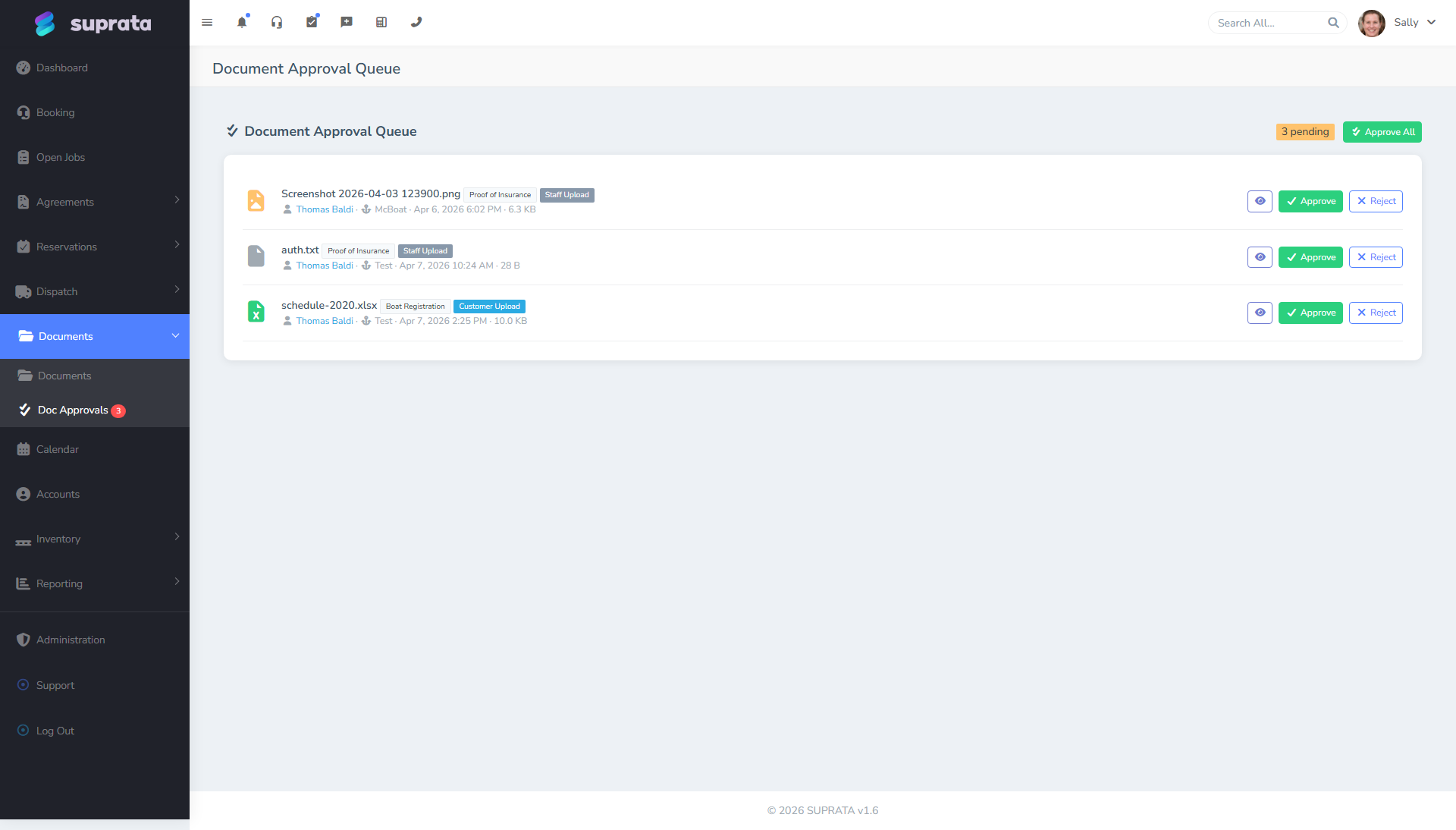
How the approval workflow fits together
Three concepts to keep straight:
- A document. Any file in the library — uploaded, generated, or anchored to a record.
- An approval. A formal request that one or more named people review and decide on the document. Each approval has a status: pending, approved, rejected.
- A decision. What an approver records — approve, reject, or request changes — along with optional comments.
A document with a pending approval is blocked from being sent or shared until decisions are recorded. That's the whole point — the workflow enforces the review.
Setting up an approval — the typical workflow
1. Decide what kinds of documents need approval
Don't try to approve everything. A short list:
- "Contracts with custom riders or non-standard terms."
- "Refunds above $1,000."
- "Pricing exceptions over 15% off the standard rate."
- "Anything from the legal-disclosures folder."
Write these criteria down as a team policy, then decide which staff trigger an approval and which approve.
2. Identify your approvers
Pick the right number. Two extremes both fail:
- Too many approvers. Every doc needs three sign-offs. Bottleneck. Stuff sits for days. Staff route around the system.
- Single approver who's always away. When the one approver is on vacation, everything stalls.
A good pattern: a primary approver and a backup, with documents routing to both and either being able to decide. Or escalating thresholds — manager approves up to $X, owner approves above that.
3. Submit a document for approval
When a staff member produces a document that requires review:
- They upload or generate the document into the library, anchored to its account/job.
- They submit it for approval, choosing the appropriate workflow if more than one is configured.
- They optionally add a note explaining context — "Custom rider for ABC Corp's MSA, increased liability cap, please review."
- The approver(s) get notified.
4. Approver reviews
The approver sees the document in their pending-approvals list. They open it, read it, and decide:
- Approve. Document is unblocked. The submitter is notified; the document can now be sent or shared.
- Reject. Document is permanently denied. Submitter is notified; if they need to send something, they need to revise and resubmit a new version.
- Request changes. Soft rejection — back to the submitter to fix and re-submit. Useful for "I'd approve this except for paragraph 4."
Comments are optional but encouraged. "Approved" with no context teaches nothing; "Approved — but next time use the new template" prevents future-you from doing the same thing again.
5. Decision is logged
Every approval and rejection is recorded with the approver's name, timestamp, and comments. The history stays attached to the document forever. This is genuinely useful when, two years later, someone asks "who approved this?"
What a healthy approval rhythm looks like
- Submitters submit promptly. A document that needs approval shouldn't sit in someone's queue for two days before it's even submitted.
- Approvers respond within one business day for routine items, faster for time-sensitive ones. If you can't make that, you've got the wrong approver list — too few people, or the wrong people.
- Comments are concrete. "Looks good" is fine for routine; anything non-routine deserves a sentence of why.
- Rejections come with explanations. A rejected approval with no comment is a recipe for resentment.
- Approvals don't pile up. Daily review by approvers — even a five-minute scan — keeps the queue moving.
Approval thresholds — keeping it sensible
A common configuration:
- Up to $500 refund: any frontline staff can issue without approval.
- $500 – $2,000 refund: manager approval required.
- $2,000+ refund: owner approval required.
Same logic for discounts, contract value, comp tickets, etc. The thresholds keep low-stakes decisions fast and high-stakes decisions reviewed. Don't set thresholds so low that 80% of routine work needs approval; the workflow becomes a tax.
What approvers should look at
A scannable checklist for approvers:
- Is the document intended for the right recipient? (Wrong-customer mistakes are surprisingly common.)
- Are the numbers right? Total, tax, dates, terms.
- Is the language standard? Or does the rider/customization match what was actually negotiated?
- Is there anything in the document the company doesn't want to commit to? (Indemnification clauses you don't usually accept; warranty extensions; etc.)
- Is the formatting clean? Typos and broken templates damage credibility.
Five-minute review for a routine doc. Longer for a custom contract. The point isn't to second-guess every decision; it's to catch the small set of meaningful errors.
Common mistakes
- Approving everything. Rubber-stamp culture. The workflow becomes a slowdown without the safety benefit. Reserve approval for things that actually warrant review.
- One single approver. When they're on vacation, everything halts. Always have a backup.
- Not commenting on rejections. Submitter doesn't know what to fix. Frustrating for everyone. Always say why.
- Sending the document outside the system to bypass approval. The whole control collapses. Train staff to route through the system; if the bottleneck is real, fix the bottleneck — don't route around the rule.
- Treating approve/reject as a quality-of-work review. It's a sign-off on this specific document, not a performance review. Keep feedback constructive and document-focused.
- No SLA on approvals. A document sitting unreviewed for a week kills momentum. State a target ("approver responds within 1 business day") and hold to it.
- Not auditing approval history occasionally. Once a quarter, glance through approved/rejected ratios and average decision times. If 100% of submissions get approved, the bar is too low or the criteria are too narrow. If 30% get rejected, the criteria upstream aren't clear.
- Approving outside business hours when tired. A 11pm "approve" on a contract with a typo is how a bad commitment ships. If you wouldn't approve it at 9am, don't approve it at 11pm.
When approvals aren't the right fit
A few cases where approval is the wrong tool:
- Time-critical communications that have to go out in the next five minutes. Build standard templates that don't need approval, and save the approval workflow for the unusual ones.
- Documents one person owns from start to finish. If you're a one-person business approving your own work, it's just an extra click — skip it.
- Recurring monthly templates. Approve the template once. Don't approve every month's copy.
Approval is a check. Like every check, it costs you a little time. Use it where the time is worth it.
Pairing approvals with sharing
Once a document is approved, the next step is usually Sharing a document with a customer. The two flows are intentionally separate — approval gates whether it goes; sharing controls how and to whom. Combine them: the approval lifts the block, the share link delivers the document.
Related articles
- Uploading and organizing documents
- Sharing a document with a customer
- Customer agreements and contract templates
- Refunds and credit policies